Three Great Ways To Ensure You Capture Useful Feedback On Your Website

Many businesses gather and utilize customer feedback in their business strategy to ensure the products and services they produce meet their customers’ needs. Integrating customer feedback helps with client communications and management, and in developing better products and services at the same time. We’ve identified three main ways to gather client feedback from your website visitors, email, of course, being a main method for gathering data on the customer experience. And, although it’s an immensely valuable method of securing honest feedback from customers, many organizations neglect to consider the customer experience when designing email channels. There are three things you should take into consideration when communicating with customers via email:

  1. Ensure you respond to customers in a speedy fashion. A recent study found that 81% of customers would be more likely to leave feedback if they thought they would get a rapid response.
  1. Develop an organized system by which customer feedback is handled. Keep track of what feedback you have received and from whom you received it, and use this information to guide future customer interactions.
  1. Follow up on all correspondence in an honest and open manner. Surveys are very challenging to develop; however, they can provide extremely useful insights. Test long and short surveys to find out which are the most effective in providing the feedback you need. Tools like Qualaroo are great for short surveys, while Survey Monkey is ideal for longer questionnaires.

Further Customer Feedback Methods 

Customer interviews provide direct feedback from your customers and allow you to develop a more personal relationship with them. When planning the customer interview process, it can be useful to focus on user attitudes toward the problems they typically encounter and employ a critical incident method to encourage customers to recall specific problems.


To quote Justin Wilcox, writing in an April 2016 article for CustomerDevLabs.com,

“Instead of being stressed about what the customer is going to think about my idea, instead of fumbling over my words and worrying about the perfect way to pitch my product, a customer interview isn’t about me, my product, or my words. It’s about theirs. All I have to do is listen. No pitching, no negotiating, just ask a handful of questions with a sincere interest to learn.”

HelpScout.net has a helpful article on the subject entitled, “The 7 Best Ways to Gather Customer Feedback”. Besides those we already mentioned, its list includes such avant-garde customer feedback methods as:

  • Usability Tests
  • Exploratory Customer Interviews
  • Social Listening
  • On-site Activity (via Analytics), and
  • Comment Boxes

That should give you a lot of food for thought on how to get your own customer feedback system up and running as part of better customer communications management (CCM) and optimizing your overall customer experience (CX).

If you have any further questions on the subject, customer relationship management (CRM) and CCM specialists at {company} can help you. Just call us at {phone}, or email us at {email} for more information.

Upgrading to macOS Sierra & iOS 10?: What You Need To Know

Remove PPTP VPN before upgrading to macOS Sierra & iOS 10

If you have recently set up a PPTP VPN server, macOS Sierra and iOS 10 users will not be able to connect to your server. This is due to the fact that macOS Sierra and iOS 10 systems have removed PPTP connections from VPN profiles once their device is upgraded. Although PPTP protocol is available on OS X El Captain and earlier or iOS 9 and earlier, it isn’t recommended for use as a private, secure method of communication.

Reasons for the Transition

It has been recently discovered that this form of VPN communication has a number of vulnerabilities. Due to these circumstances, Apple has gone forward by encouraging customers to move on to safe, secure VPN protocols and quit utilizing PPTP for VPN connections.

As this decision was made in part by the release of iOS 10 and macOS Sierra, Apple decided to remove PPTP support completely in order to warn customers of the security holes found in the built-in VPN client. By recommending the usage of other VPN clients, Apple customers can continue to receive reliable service from secure communication protocols.

If one happens to need access to PPTP VPNs, it is possible to utilize a third-party client with macOS Sierra. If one happens to use OS X El Capitan, popular third-party VPN clients (that support PPTP) are VPN Tracker and Shimo.

Other Alternative VPN Networks

If one is at a loss in terms of what VPN protocol they should utilize, more secure protocols have been:

  • Cisco IPSec
  • IKEv2/IPSec
  • L2TP/IPSec
  • SSL VPN clients that can be found on the App Stores. Such clients that can be found are SonicWall, Pulse Secure, Palo Alto Networks, Open VPN, NetMotion, MobileIron, F5 Networks, Cisco, Check Point, Aruba, and AirWatch.

If you happen to have difficulties figuring out what VPN is best for you in {city}, feel free to contact {company} via phone at {phone} or email at {email} today.

7 Quick Tips to Help You Maximize Employee Productivity

There are only so many hours in a day, and figuring out how to get the most out of each one is a trick we all wish we could master. Or perhaps more importantly, it’s a trick you wish your employees could master. Getting them on the right track is easier than you might expect. As with any skill, the key is to start small.


Here are 7 simple things you can do starting right now that can help to boost productivity for your entire team:

  • Utilize Keyboard Shortcuts ­- A keyboard shortcut is simply a sequence or combination of keystrokes that will allow you to perform certain functions, or prompt certain commands in software. There are hundreds of keyboard shortcuts. Some are universal, others are specific to a program or operating system. Having an arsenal of shortcuts for the programs and applications you use every day can be a big time-saver. Think about how often you use something like ALT + Tab to switch between windows, and how annoying it would be to have to go back to using your mouse instead. It may only take a few seconds, but when it’s an action you repeat constantly, those few seconds start to add up.
  • Take Advantage of Outlook Integrations – There are a ton of handy apps and programs that can integrate with your Outlook account. You’re already using your email constantly throughout the day, so making it a tool to help you complete other tasks and stay organized almost feels like common sense. For example, connecting your Outlook account to your Skype account lets you send instant messages and place calls right from your inbox.
  • Utilize the Right Software Platform for Every Need – Whatever you’re trying to manage, create, or complete, chances are there are a dozen different programs or applications that can help you do it. Finding the software that works best for the task at hand and integrates well with the rest of your system might take a bit of research, but it’s well worth the effort. Relying on generic software just because it’s there can be a huge waste of time and energy, and make something simple take twice as long to accomplish.
  • Allow Your MSP to Deal with Vendors on Your Behalf – When your Internet connection goes down, your team is going to have their hands full trying to work around the obvious issues this will create for your business. Asking an employee to step back from an already hectic situation to sit on the phone with your provider to get back up and running is not ideal. By leaving problems like this in the capable hands of your MSP, your staff is free to focus on managing your business while the problem is dealt with by professionals who not only will have a better grasp of what the problem is, but also know your IT infrastructure inside and out. Make your MSP your main point of contact for all things tech-related, and you can spare yourself a lot of frustration when something goes wrong.
  • Have Backup Hardware Available – Computer troubles are never ideal, but having a spare on hand that can be put into use quickly can make a huge difference with regards to offsetting downtime. Consider investing in a backup computer for each of your departments. A system that already has all required software installed and ready to go makes it possible for your employee to get back to work in minutes, instead of losing hours or even days of productivity while the faulty PC is repaired or replaced.
  • Use Dual Monitors – Adding an extra screen to your workstations can save a heap of time by allowing employees to multitask by referencing one screen while working on the other, or comparing documents to make finding necessary information easier. Typing up a report will go much faster when the spreadsheet it’s based off is open and sitting right next to your Word document, offering up data at a glance.
  • Eliminate Social Media Distractions – The urge to check Facebook or Twitter periodically throughout the day can be tough to ignore. Consider using an app like Freedom to block social media sites and allow you to work distraction-free, or set your firewall permissions to prevent access to social media sites from within your office altogether. If you want your workplace to be a work-only environment, there are tools available to make that possible.

Want to learn more about the ways {company} can help your business maximize productivity? Contact us at {email} or {phone}. We’re the productivity experts local businesses trust.

Guarding Against DDoS Attacks

On October 21, we learned that the distributed denial-of-service attack has become a vastly greater threat than ever before. By attacking domain name service provider Dyn, a botnet was able to make multiple websites largely unreachable, including Netflix, GitHub, Twitter, the New York Times, and many others. Overloading Dyn with spurious domain name lookups kept it from responding to legitimate requests.


DDoS attacks have been around for a long time. The attacker gets control of a large number of machines and coordinates them to flood the target with data packets. 2016 saw attacks of unprecedented scope.

The reason is the Internet of Things. Smart devices perform simple tasks with the aid of an Internet connection. The owner can control them or get information from them remotely. Most of them have very poor security. They have default user names and passwords which are difficult to change. Some have their own Wi-Fi access points, without adequate security. Criminals use software such as the infamous “Mirai” to take control of these devices by the thousands and build botnets from them.

Traditional computer security measures provide little protection against these attacks. New approaches, designed to meet an attack of a million pinpricks, are necessary.

Monitoring traffic for changes from the normal pattern is the first line of defense. The more quickly you can detect an attack, the more quickly you can stop it. Specialized software can dynamically analyze traffic patterns and distinguish bogus from legitimate data packets, giving a quicker indication that an attack is under way.

Standard firewalls give very limited protection against DDoS attacks. A Web application firewall (WAF) provides more help by using application-specific rules to block malicious and malformed requests, but it won’t stand up against a heavy attack.

A cloud-based mitigation service is the strongest defense against serious DDoS attacks. The people running the service are specialists, and they constantly update their service as new forms of attack appear. These services have large amounts of reserve processing power and can put multiple machines on a single IP address. This extra capacity lets a site absorb a much larger amount of traffic without exceeding its capacity.

Website owners can never stand still. New threats develop and require new defenses.

Contact us at {email} to learn more about our services, or call {company} in {city} at {phone}.

700 Million Android Phones May Be Sending Data to China Right Now

Significant vulnerability may be affecting as many as 700 million Android smartphones and devices RIGHT NOW.

The world around us is getting more dangerous all the time, particularly as businesses leap head first into the new digital world in which we now live. Case in point: a pre-installed backdoor exploit that is currently on as many as 700 million Android phones around the world is in all likelihood sending incomprehensible amounts of personal data to China. If you happen to be an Android smartphone owner and are concerned about the safety of your business, this is one story you’re definitely going to want to pay attention to.


What Happened?

Security researchers at Kryptowire recently discovered a backdoor exploit hidden in the firmware of many “budget” or “entry-level” Android smartphones sold in the United States. The backdoor firmware, developed by Shanghai AdUps Technology, has the ability to secretly send a massive amount of personal information to China in 72 hour increments. The types of data that could be sent without the user’s knowledge include SMS text messages, contact lists, location history, personalized app data and a whole lot more.

What This Means

First, the bad news: even though security researchers have discovered this backdoor exploit, it is baked into the firmware in such a way that users cannot remove it. It is up to the software development companies themselves to release patches that address the issue head-on.

Though the total number of affected phones is massive, knowing whether or not you personally have been a victim is also difficult to determine. A spokesperson for ZTE USA, for example, provided a statement that no devices from the company sold in the United States have ever had the affected software (AdUps) installed on them.

BLU Products, another major player in the Android world, IS affected. The company recently confirmed that as many as 120,000 of its smartphones have the affected software installed.

This seems to be one argument that is decidedly FOR the “walled garden” architecture of Android competitor Apple. Whereas manufacturers can make adjustments to the software installed on an Android phone (similar to the way computer manufacturers do with Windows), Apple is the sole developer and publisher of the iOS mobile operating system.

We take our responsibility as your leading provider of technology news, tips, tricks and best practices very seriously. If you’re in {city} and you’d like to find out more about this or any other IT topic, please don’t hesitate to contact us today at {email} or by phone at {phone}.

7 Strategies To Modernize Your Insurance Company’s Information Technology

A discussion of the seven core strategies that insurance companies can use to modernize their IT efforts.

When it comes to information technology, the legacy systems of yesterday are very rarely capable of handling the unique challenges of today – to say nothing of the difficulties posed by the possibilities of tomorrow. This is especially true for insurance companies, where core system transformation is expected to remain a top priority across the board for the next several years.


Modernizing insurance company information is time consuming, costly and risky – but it is not impossible. For insurance companies to truly build and implement the solutions they need, they must keep a few important strategies in mind.

Build With a Purpose in Mind

Perhaps the number one way to modernize insurance company information technology is to build not necessarily with the challenges of today in mind, but with the end results needed for tomorrow. Insurance companies need to have systems in place that don’t just keep things like investment budget or time to market in mind, but also with future plans, strategic priorities and more. It’s a balance to be sure, but it’s an important balance to strike.

It’s About the Entire Organization

If insurance companies really want to modernize their information technology, they need to have the backing of the entire company – not just the IT department. Not only all departments, but also vendors, need to provide their input to build a system that EVERYONE sees value in and that will benefit EVERYONE moving forward. If IT decisions are made in an IT silo, it will be much harder to get everyone on board.

Focus on Change Management

In the insurance company, needs change on a regular basis. Customer preferences are fluid, regulatory norms one day are gone the next. To truly modernize insurance company IT, change management must become a priority. Business sponsors, program management officials, experts, vendors and more should all be able to regularly monitor deployment until the end of the program for the absolute best results moving forward.

Picking the Right Partners is Critical

As stated, modernizing insurance company IT is something that CANNOT be done with only the IT department. Partners are needed, but those partners must be vetted very carefully to help make sure they have the relevant experience in a project of this scope and magnitude. Partners must be able to handle the heavy level of customization that is going to be needed, must have credibility, must be able to help support changes that themselves support key business requirements and more.

Understand That Risk Never Goes Away

When it comes to executing an insurance company IT infrastructure update, one of the most important keys to success involves the understanding that risk is always a present. When it comes to something as fickle as IT, things going wrong is not a question of “if” but “when.” Project leaders need to have risk assessment plans so that they not only know what they’re up against, but so that mitigation plans can be developed in the most effective way possible.

Pay Close Attention to Data Migration

When it comes to modernizing insurance company information technology, there are two key factors to concern yourself with. The first is the new system requirements, processes and other infrastructure changes that will be required. The second (and equally important) is the critical data that will need to be converted and migrated from the old system to the new without issue.

Insurance companies will need to build an approach for how to handle active policies, claims, transactions, data quality and more before, during and after this process.

Service Oriented Architecture

Modern insurance company IT demands a certain level of flexibility and versatility that can only be provided by SOA support, or Service Oriented Architecture. When it comes time to integrating between peripherals and external systems, having a separate team on-hand to oversee this very important (and time consuming) process is always advised. This is a team that won’t have to split their attention in countless directions and can instead focus on the important task at hand.

At {company}, we’re dedicated to helping make sure that all of our clients in {city} and the surrounding areas have access to every last technology tip, trick and news item they need to run the types of businesses they’ve always dreamed of. To find out more information about this or any other IT topic, contact us at {phone} or send us an email at {email}.

Client Project Spotlight: Hosted Server Needs

Inspired IT recently helped a new client get on the right track with their hosted servers. They had been having replication issues, and were wanting to move to an RDS solution. We scoped the project for them, and once it was approved, setup their new IT environment.

Before partnering with Inspired IT, this client had been using a hosting company’s email solution and AWS S3 Storage for their important work files. They were experiencing so many issues with syncing the documents to all of their staff that they had resorted to a manual backup strategy to compensate.

Inspired IT provided them with an Office 365 solution for their email needs, and migrated all of their archived emails over to the new platform. To handle their infrastructure, the client wanted an Active Directory server, a File Server, and an RDS Server. We configured this for them using ZettaGrid cloud. Their data was exported from the AWS S3 Storage to the new hosted infrastructure, and a ZettaGrid backup solution was set up. The client now has a scalable, protected infrastructure that fits their needs.

Want to find out more about how Inspired IT can help manage your business’ hosted server needs? Contact us at {email} or {phone}. We’re the IT experts local businesses trust.

John Podesta and Colin Powell’s Email Accounts Hacked – And How

It happened on March 19 of this year – campaign chairman for Hillary Clinton John Podesta unwittingly clicked on a link in an email he thought was from Google corporate. It wasn’t from Google, but rather from a group of phishing hackers the US government has since linked to Russia. Podesta wasn’t aware the link was malicious at the time he clicked on it, but doing that gave the hackers access to his entire email account. Fast-forward to October 9, when WikiLeaks began publishing thousands of Podesta’s emails, the motive seen by many as the desire to influence the US Presidential election by exposing Clinton camp improprieties. Now there is evidence that it may have been the same hacker group that targeted the Democratic National Committee.


Both hacking incidents were done using the same malicious short URLs that are routinely hidden in fake Gmail messages by black hat hackers. Those URLs were created with a Bit.ly account linked to a domain controlled by a hacker named Fancy Bear, one of the identified Russian hackers. Data also shows a “clear thread” between allegedly separate and independent leaks that have shown up on a site called DC Leaks which included some of both Colin Powell’s and John Podesta’s emails.

Fancy Bear and Political Hacks

Hidden in the Bit.ly link was a longer URL that included a 30-character string that actually contained the encoded Gmail address of John Podesta. The link was clicked on twice in March, acts which opened up Hillary Clinton’s campaign manager’s email account to exploitation and revelation on a major scale. The link was just one of thousands created by Fancy Bear which were used to target nearly 4,000 persons between October 2015 and May 2016.

The Fancy Bear hacker group used two Bit.ly accounts to create the malicious links, but forgot to set those accounts to private, allowing “good guy” hackers like security firm SecureWorks to track their use through command and control domains and servers. Fancy Bear used 213 shortened links targeting fully 108 email addresses on the HillaryClinton.com domain, as reported by SecureWorks and in BuzzFeed earlier in October. Using Bit.ly “allowed third parties to see their entire campaign, including all their targets— something you’d want to keep secret,” said Tom Finney, a researcher at SecureWorks.

According to Thomas Rid, professor at King’s College, it was “one of Fancy Bear’s gravest mistakes,” explaining that it gave researchers unparalleled visibility into the hacker group’s activities, which resulted in investigators being able to link different, supposedly disparate parts of its larger campaign together. Using the encoded strings, embedded inside the shortened links, and which targeted numerous political figureheads like Podesta, Powell, and Clinton staffer William Reinhart, effectively revealed their targets for any and all eyes to see.

No Smoking Gun

Although the evidence is clear and profound, it doesn’t constitute any kind of smoking gun that can unequivocally link the phishing attacks to the Russian hackers, in early October the US government publicly accused the Russian government of not only sponsoring but directing the attacks. And as Motherboard put it in their piece entitled, “How Hackers Broke into John Podesta and Colin Powell’s Gmail Accounts,” “The intelligence community declined to explain how they reached their conclusion, and it’s fair to assume they have data no one else can see.”

Need Cybersecurity Advice?

If you need advice about cyberattack preparedness, cyber safety awareness and security, {company} is a proven leader in providing IT consulting and cybersecurity in {city}. Contact one of our IT experts at {phone} or send us an email at {email} today, and we can help you with all your questions or needs.

Multi-Factor Authentication a Good Solution to Unauthorized Access Problem

The use of only passwords – even well-encrypted ones – for login permission is not enough, it seems, to stem the tide serious problem of black hat hacking and unauthorized access. Across the cybersphere, it seems the more frequently a given company or individual updates their passwords that just as fast there is a “cracker” ready to decrypt them in order to gain unauthorized access. Amidst all of this is the recent statistical revelation that employees are the biggest cyber threat in the workplace. It seems that the only thing agreed-upon in the Admin vs. User game is that passwords alone are not enough to guarantee secure login and access control. They are a distinct problem, in fact, which multi-factor authentication enabling can remedy.


Valid Alternatives

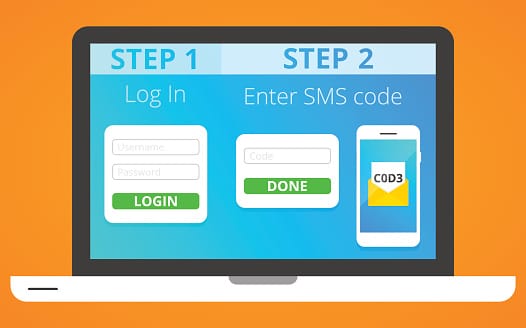
With passwords presenting such a problem globally, the search for valid and viable alternatives is fast becoming essential for any venture. PIN (Personal Identification Numbers) work out to be simply numerical and shorter forms of passwords, though in certain cases PINs can provide greater levels of security, due to being tied to a specific device. Multi-Factor Authentication (AKA MFA, or Two-Factor Authentication, Two-Step Authentication, or TFA), then, presents itself as the best and most valid alternative to passwords in the battle for ultimate security in login access. Why? Because MFA provides a step-by-step, real-time process of validating a user’s identity, the steps for which must happen in a given order if entry is granted. MFA has three essential tiers of authentication, which include:

  • Knowledge, in the form of something only the valid user knows, such as a PIN.
  • Possession, defined by a thing which only that user possesses such as smartcards, hardware/software tokens, soft tokens, or a registered phone number.
  • Inherence, in the form of something only the valid user is, verified through biometric information.

The Case for Multi-Factor Authentication

Multi-Factor Authentication makes the most sense for any business venture or organization that is required to take electronic communication security seriously. Because MFA is tied to users’ identity in a strict way, it largely obviates the most popular form of cyberattacks and threats – leveraging stolen passwords. As a result, MFA provides the highest measure of security assurance for organizations of all types.

And, because MFA can also pinpoint and track user identity in such an exacting manner, enterprises can better track on a use-by-use basis exactly who is accessing their databases, along with when, where, and how. For a long time, SMBs and even corporate structures overlooked the importance of having MFA as part of their IT security, because it was seen as too costly. Now, with the rise of ransomware hacks and other costly cyberthreats, MFA in 2016 is altering the security paradigm through being both easier to implement and use, as well as more affordable.

Many platforms, such as Microsoft, Amazon and Google, now allow you to set up multi-factor authentication for your online accounts. The first factor of which is the traditional user name and password (or PIN), while the second is either a phone call that you answer to obtain a verification code, or a phone app notification in which you enter your pre-determined PIN code. Microsoft recently released a new version of their Microsoft Authenticator app for Android and iOS that lets you perform MFA for both your Azure business account and your Microsoft accounts – both personal and business.

Heads in the Cloud

Any technology solution needs to balance sharp-eyed security against the user adoptability quotient. Cloud applications, for one, weren’t designed to work in tandem with legacy MFA capabilities.  Those legacy solutions were strictly built for on-premises resources, long before “cloud” or “mobile” meant anything in the world of IT.  Recently-generated MFA methods, however, can make strong authentication an easy, convenient, and secure option for virtual and cloud-accessing networks.

Have Questions About Implementing MFA for Your Network?

If you have questions or concerns about multi-factor authentication, {company} is the leader in providing cybersecurity and IT consulting in {city}. Contact one of our expert IT staff at {phone} or send us an email at {email}, and we will be happy to help you attain better security verification methods for your business network.

Three Reasons Why Net Promoter Score is Important

Few business owners are content with maintaining the status quo and always have an ear to the ground for new growth strategies or indicators of future performance. One metric, the Net Promoter Score, is gaining popularity as the team’s foundational focus is to gauge the health of their products and services. Given its importance, we’ve outlined below the basics of how it works and three reasons why Net Promoter Score is important to your business.


What is the Net Promoter Score?

The Net Promoter Score (NPS) is a concept that was first introduced by Frederick F. Reichheld in a 2003 Harvard Business Review article. The NPS is a simple yet powerful tool that gauges customer loyalty by asking one straightforward question:

Would you recommend our company to someone you know?

According to Reichheld, the response to this question is a strong predictor of a company’s growth and overall success. The more customers you can get to answer this question, the more accurate your NPS will be.

Customers are asked to rate their likelihood of recommending the company on an 11-point scale, from 0 (least likely) to 10 (most likely). Based on their responses, customers are then grouped into three categories:

Promoters

These are the customers who give a score of 9 or 10. They are likely to contribute to the company’s growth by making repeat purchases, advocating for your brand, or becoming long-term customers.

Passives

Customers who score a 7 or 8 fall into this category. They are somewhat satisfied but lack enthusiasm and are unlikely to actively promote your brand.

Detractors

Customers who give a score of 6 or less are classified as detractors. They are likely dissatisfied with their experience and may not only refrain from making future purchases but could also damage your brand’s reputation by sharing their negative experiences.

Understanding your NPS and the distribution of promoters, passives, and detractors can provide valuable insights into your customer loyalty and overall brand health.

How Is the Net Promoter Score Calculated?

At its core, the NPS is a feedback mechanism in which users or customers are asked to evaluate how likely they are to recommend a given product, service, or brand to those in their network. Those who respond are grouped into three categories based on their enthusiasm on a 1-10 scale: Promoters, Passives, and Detractors.

Those ranking a 9 or 10, the Promoters, are champions of the brand, advocating strongly for it and helping the business through referrals. In the middle of the spectrum, Passives rank 7-8 and are those without a strong tie, making them likely to hop between competitors and basing allegiances around short-term cost or features. Lastly, the Detractors exist anywhere from 0-6 on the scale and represent those who might actively dissuade other prospects from trying your service.

The NPS itself is calculated by subtracting the percentage of folks in the Detractor end of the range from those 9s or 10s who are Promotors. So now that you know how it works, how do we put it to use?

The Importance of Net Promoter Score

In the realm of business, customer loyalty is a key driver of growth and success. One metric that has gained widespread acceptance for measuring this crucial aspect is the Net Promoter Score (NPS). The NPS is not just a number; it’s a reflection of your customers’ experiences, their satisfaction, and their willingness to advocate for your brand.

The beauty of NPS lies in its simplicity. It’s based on a single, direct question that cuts to the heart of customer loyalty. Yet, the insights it provides are profound, offering a clear view of your company’s standing from the customer’s perspective and a reliable predictor of your business’s future growth.

But why exactly is the Net Promoter Score so important? Let’s delve into the three key reasons that underscore the significance of NPS in today’s business world.

Immediate feedback

Because NPS feedback can be solicited through email campaigns, within a platform, or by social media, scores can be collected in real time, rather than at fixed intervals periodically. Making it easy for customers to provide information on their experience in real time provides more opportunities to capture data, and this data can in turn be used to inform decisions.

These timelines are important because a new feature or service change causing a drop or uptick in NPS from that point forward is a clear indicator of how smoothly that initiative was rolled out, or whether it was seen as an improvement to the offering. It’s important to not overreact, because even if no changes are made in response, scores sometimes level out shortly thereafter, indicating folks were simply adjusting to the change. Keeping tabs on these fluctuations and responding accordingly is a great way to either capitalize on momentum or right the ship before things get too far off course.

Create A Dialogue

Perhaps the best part of collecting NPS data is the ability to interact with those who take the time to submit their feedback. Customers who voice their opinions (good, bad or otherwise) are customers who want to be heard. Acknowledging their criticisms and thanking them for their praise helps humanize the frontline of the business, and goes a long way toward actually boosting the NPS in the long run.

Reaching out to a Detractor quickly to solve a problem can help keep them from bad-mouthing your reputation, and connecting with someone who’s Passive provides an opportunity to further improve a mediocre experience, possible moving them into Promoter territory.

Expansion Across the Business

When fully adopted, NPS is an opportunity not merely to measure feedback, but create campaigns, initiatives, and even employee roles dedicated to improving customer experience, boosting company health in the long run.

Especially savvy business owners take things a step further, measuring E-NPS, or employee satisfaction. As a tool to monitor employee morale and willingness to advocate for the business, E-NPS can be a huge boon to both retention and recruiting, drastically limiting personnel costs.

Harnessing the Potential of NPS

The Net Promoter Score is more than just a number; it’s a powerful tool that provides valuable insights into your customers’ loyalty and your company’s potential for growth. By understanding and leveraging your NPS, you can enhance customer satisfaction, foster brand advocacy, and drive business success.

Remember, a high NPS indicates not just satisfied customers, but promoters – those who are willing to recommend your brand to others. In the competitive business landscape, this kind of word-of-mouth promotion is invaluable. So, invest in understanding your NPS, and use it as a compass to guide your business towards sustained growth and success.


What Does the Workforce of the Future Look Like?

If the year was 1995 and you were to ask anyone, even a tech visionary, about what the workforce of the future would be capable of, they’d be hard pressed to arrive where we are now. Individuals in a wide variety of disciplines are working in ways that are more productive, more capable and more mobile than ever before. However, in many ways, modern-day workers are still held back by the technology and working habits of yesteryear. Landline phones, desktop computers and office cubicles are increasingly becoming things of the past. The future seems to be capitalizing on the three aspects mentioned above: productivity, capability and mobility.


  • Mobility. Advances in mobility are going to decrease interaction time between employees, yet increase productivity at the same time.
  • Productivity. Continued advances in technology will produce better, faster tools for a globally connected workforce to work with.
  • Capability. Employees will better understand the tools they need to accomplish business goals through both more comprehensive training and more intuitive user interfaces.

The Digital Workforce’s Four Areas of Advancement

The advances in mobility, productivity and capability mentioned above will take place as a result of innovation in four sectors:

  • Sharing Economy. The sharing economy is already here. It is defined by collaborative consumption as demonstrated by brands like Uber and AirBNB. These brands encourage people who already own things to use them commercially. 63 percent of global employees plan on entering the sharing economy in the next year, either as consumers, sellers or both.
  • AR/VR. Virtual reality as seen in countless science fiction films is only a few steps away from becoming a part of employees’ daily lives. It’s already being used in training applications in a select few disciplines, but its range of applications continues to increase. Mobile offices with AV/VR capabilities will be the final step towards rendering the traditional office cubicle obsolete.
  • Artificial Intelligence. Advances in AI are poised to transform the way people do business on all levels, but introduce the possibility of job loss that many employees rightly fear. It is very likely that entry-level positions in many industries will be automated in ways never before possible.
  • Internet of Things. As time goes on, increased connectivity between devices combined with artificial intelligence will amplify the amount of work that a single individual can do. It makes remote work even more capable of producing results previously limited to a centralized office.

The workforce of the future will use these tools to automate the vast majority of business processes that do not need immediate human attention. This can include everything from logistics to scheduling; artificially intelligent digital assistants will perform mundane tasks and even resolve issues on their own when possible. It seems like the workforce of the future may consist of two broad categories of workers: Those who tell software what to do, and those who are told what to do by software.

{company} is the trusted choice when it comes to staying ahead of the latest information technology tips, tricks and news. Contact us at {phone} or send us an email at {email} for more information.

What is a Cloud Migration Strategy? Moving to the Cloud Successfully

Cloud migration is no longer a trend but a fundamental shift in the way businesses operate. Understanding what moving to the cloud entails and why a strategic approach is vital can be the difference between success and failure in today’s competitive landscape.


What is Cloud Migration?

Cloud migration encompasses the transition of a company’s digital assets, services, databases, IT resources, and applications into the cloud. This migration can be partial or complete, and it may also involve moving from one cloud environment to another.

For many businesses, the decision to migrate to the cloud comes from the need to move away from outdated and inefficient legacy infrastructures. This includes:

  • aging servers,
  • unreliable firewall appliances,
  • or hardware and software solutions that no longer operate to their full capacity.

The cloud offers a modern alternative, providing the benefits of cloud computing and enabling businesses to enhance their performance and efficiency.

Cloud migration is not just a technical process; it’s a strategic move that requires careful analysis, planning, and execution. Ensuring compatibility with your business requirements is paramount. It’s not just about reaching the cloud but optimising what you do once you’re there. For example, rebuilding applications to perform optimally in the cloud is a critical consideration, leading many companies to explore application modernisation.

The journey to the cloud raises many questions, and businesses of all sizes often seek professional help to navigate this complex process. Whether it’s through lift-and-shift cloud migration capabilities or classic modernisation services like automated language translation and conventional re-platforming, service firms play a vital role in facilitating successful cloud migration.

In essence, cloud migration is a multifaceted process that goes beyond mere technology. It’s about aligning with business goals, embracing innovation, and positioning the organisation for future success.

Understanding Cloud Migration Strategies

Different migration strategies suit different business needs. Common strategies include:

  • Lift-and-Shift: where applications are moved without modification.
  • Refactoring: where applications are rearchitected for the cloud.

Choosing the right strategy depends on various factors, including cost, performance, and business objectives. Understanding the role of cloud service models like SaaS (Software as a Service), PaaS (Platform as a Service), and IaaS (Infrastructure as a Service) is crucial in this decision-making process.

Why Companies Are Moving to the Cloud

There are many benefits of cloud migration. From cost savings to enhanced agility, companies are leveraging the cloud to stay ahead of the curve. The future of cloud migration looks promising, with continuous innovation and growth.

Challenges and Risks in Cloud Migration

While the rewards are significant, cloud migration is not without its challenges. Compliance, security, and potential data loss are some of the risks that must be carefully managed. A well-thought-out strategy can mitigate these risks, ensuring a smooth transition to the cloud.

5 Things to Consider During Your Cloud Migration

1. What are your goals?

Doing it becauseyou’ve seen other businesses doing it is ok, but you will want to have your business goals for cloud migration clear. For example, “We will have 80% of our database in cloud computing virtual servers, which will save us X dollars, and boost productivity by 30%.” There are many goals that can be reached by utilising cloud services. Figure yours out, write them down, and pin them to the wall, with the entire office cognisant of them.

2. Decide just how much storage you need.

You don’t want to walk into this like you’re on a Vegas weekend after getting paid. Cloud services can be pricey, even if they do offer long-term savings as part of the cloud perks. Sit down with your accounting team and carve out a budget for cloud storage based on exactly what the company needs. Visualise it, get it in writing, and implement it into your budget before you go grabbing cloud storage server space like it’s going out of style.

3. Have the maximum Internet bandwidth possible.

This is a very important point: You DO NOT want to be stuck with cloud services operating on degraded or minimal bandwidth. It’s like watching your favourite movie on a lower page load speed. You don’t like watching that wheel spinning as your video loads, so why would you want that when using cloud services? Have the adequate internet bandwidth to match the amount of cloud storage, software, and service you’ve contracted for, so hair-pulling won’t approach becoming an Olympic event for you.

4. Cherry-pick the cloud services you want.

You will probably want Office 365. And some kind of Software as a Service (SaaS) provider, though you will want to designate exactly how much space you will need. Beyond that, you can prudently select the kinds and amount of cloud services you require. With the cloud computing service industry spiking, both time and money are of the essence. Choose your particular services well, and pair them up with your business model and data centre needs like you’re choosing the right living space for your needs and habits.

5. Make sure your on-boarding and off-boarding clause is reasonable.

Here’s another big one. This is one that is often overlooked in the race and excitement of obtaining cloud services: Don’t get stuck in a contract that gives you no leeway, should you become dissatisfied with the services. Make sure you have a reasonable off-boarding or out clause in the contract that you can cite if or when you become unhappy or feel overwhelmed by your cloud services contract. A good IT services company will work with you and consider your reasons for getting out, not hem you in with a cost-prohibitive contract.

Inspired IT staff helping customer on the phone

The Role of Innovation and Agility in Cloud Migration

Cloud migration is not just about moving data; it’s about enabling business innovation. The flexibility and scalability offered by the cloud foster agility, allowing businesses to adapt to market changes and seize new opportunities.

Understanding what a cloud migration strategy entails is essential for any business looking to leverage the power of the cloud. Strategic planning, careful execution, and continuous monitoring are key to a successful migration. Whether you’re just starting your cloud journey or looking to optimise your existing cloud infrastructure, a well-defined strategy is your pathway to success.

At Inspired IT, we specialise in guiding businesses through this critical transformation. Our team can tailor a cloud migration strategy that aligns with your unique business goals and ensures a seamless transition. Don’t leave your cloud migration to chance; partner with Inspired IT and experience the benefits of a professionally managed and executed migration.