The Role of Value-Added Resellers (VARs) in IT Consulting

In the fast-paced, ever-evolving realm of information technology, businesses are often caught in a web of intricate challenges. These hurdles demand not just solutions, but specialised ones, tailored to address the unique needs of each business.

Value-Added Resellers, or VARs are the bridge builders in the world of IT, connecting technology vendors with businesses. They are the translators, taking the language of tech and turning it into a dialect that businesses can understand and utilise.

But they don’t just connect and translate. They enhance, they refine, and they customise. They take existing products, sprinkle in their magic, and transform them into solutions that fit businesses like a glove.

Intrigued? Let’s dive deeper into the world of VARs and explore their pivotal role as Value-Added Resellers in IT Consulting.

What is a Value-Added Reseller (VAR)?

A Value-Added Reseller, or VAR, is a unique type of business entity. They operate by enhancing the value of third-party products. How do they do this? They add customised services or features to these products before reselling them to end customers.

In the IT industry, these services can take many forms. They often include system integration, training, installation, and ongoing support. But that’s not all. VARs also combine existing products with their own or others’ software or hardware. The result? A complete package that’s ready to meet the specific needs of the end customer.

In essence, VARs are the bridge between IT vendors and businesses. They take the raw technology and mould it into a solution that fits the business like a glove.

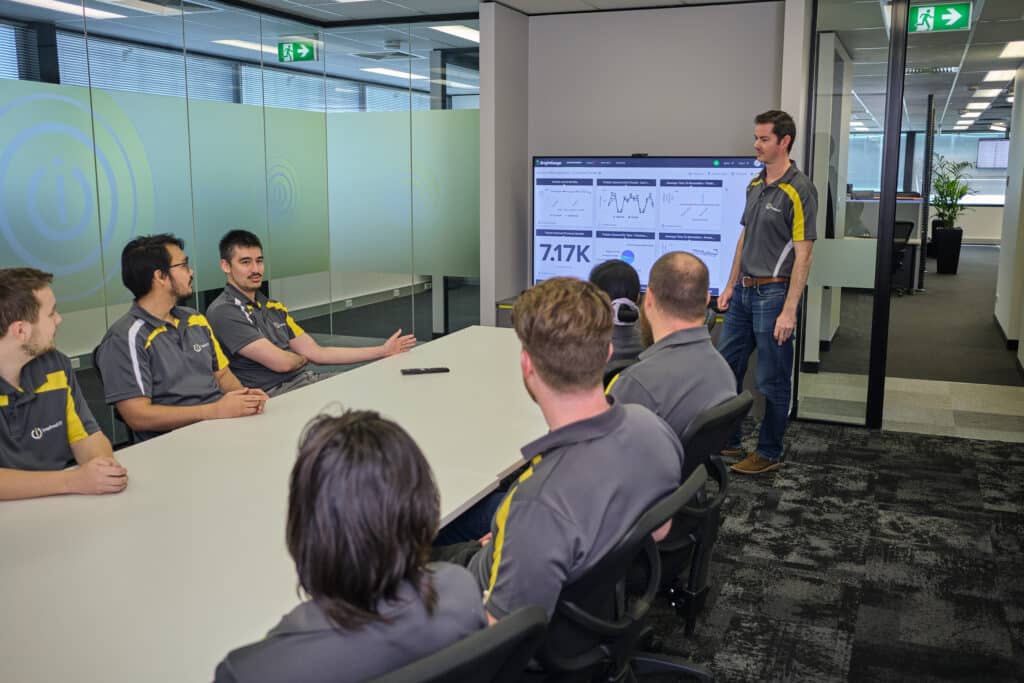
IT Consulting team

How VARs Operate in the IT Industry

Operating in the IT industry, VARs form strategic partnerships with IT vendors, enabling them to offer a comprehensive suite of services. They cater to a wide range of clients, from small businesses to large corporations, providing tailored IT solutions that address specific business needs. VARs are known for their ability to offer a one-stop-shop experience, handling everything from software and hardware procurement to system design and implementation.


The Relationship Between VARs and IT Consultants

Collaborative Efforts

VARs and IT consultants often work hand-in-hand to deliver comprehensive IT solutions. While VARs provide the hardware and software, IT consultants offer their expertise to ensure these technologies are implemented effectively and align with the business’s strategic goals. If you’re wondering exactly what an IT consultant does, you can learn more in our blog post about What is an IT Consultant? This collaborative approach ensures that the IT solutions provided not only meet the technical requirements but also support the broader business objectives.

The Role of IT Consultants in VARs’ Projects

IT consultants play a crucial role in VARs’ projects. They analyse the business’s needs, design the IT infrastructure, and oversee the implementation of the technology solutions provided by the VAR. Post-implementation, they ensure the solutions are working as intended and provide ongoing support. Their role is critical in ensuring that the technology solutions provided by the VAR align with the business’s strategic goals and deliver the desired outcomes.


The Benefits of VARs in IT Consulting

Enhancing Technological Capabilities

VARs play a pivotal role in helping businesses stay abreast of technological advancements. By providing customised solutions, they enable businesses to leverage the latest technologies, thereby enhancing their competitive edge. Whether it’s implementing a new enterprise resource planning system or upgrading network infrastructure, VARs bring the necessary expertise and resources to help businesses enhance their technological capabilities.

Providing Comprehensive IT Solutions

Through their partnerships with various IT vendors, VARs can offer a wide range of products and services. Coupled with the strategic guidance of IT consultants, they can deliver comprehensive IT solutions that address all aspects of a business’s IT needs. This could include everything from hardware and software procurement to system integration, training, and ongoing support.

Inspired IT Managed IT Services meeting

Cost-Effective IT Consulting

By offering tailored IT support, VARs ensure businesses only pay for the services they need. This approach, combined with the strategic input of IT consultants, can result in significant cost savings for businesses. Instead of investing in expensive technologies that may not be fully utilised, businesses can leverage the expertise of VARs and IT consultants to implement cost-effective solutions that deliver maximum value.


The Future of VARs in IT Consulting

Emerging Trends

The world of IT consulting is in constant flux. New trends emerge, and VARs must adapt to stay relevant. So, what are the emerging trends shaping the future of VARs in IT consulting?

One major trend is the increasing demand for cloud-based solutions. Businesses are moving away from traditional on-premise systems and embracing the cloud. Why? The cloud offers scalability, cost-efficiency, and access to the latest technologies. For VARs, this means a shift in focus. They must develop expertise in cloud-based technologies and offer services like cloud consulting and managed services.

Cybersecurity is another key trend. As businesses become more digital, they face greater security risks. VARs can play a crucial role here. They can help businesses protect their digital assets by offering cybersecurity services.

Artificial Intelligence (AI) and Machine Learning (ML) are also making waves in the IT industry. These technologies can help businesses automate processes, gain insights from data, and improve decision-making. VARs that can integrate AI and ML into their offerings will have a competitive edge.

The Impact of Cloud Computing on VARs and IT Consulting

Cloud computing is revolutionising the IT industry, and VARs are no exception. As businesses increasingly migrate to the cloud, VARs and IT consultants must adapt their services to meet these changing needs. This includes developing expertise in cloud-based technologies and offering services such as cloud consulting and managed services. Stay tuned for our next blog post, where we’ll delve deeper into the world of cloud consulting.


Conclusion

The Importance of VARs in IT Consulting

In conclusion, VARs play a crucial role in IT consulting. By providing customised solutions and working closely with IT consultants, they help businesses navigate the complex world of IT, enhancing their technological capabilities and providing cost-effective solutions. Their role is set to become even more important as businesses continue to grapple with rapid technological changes and the increasing complexity of IT environments.

Preparing for the Future of IT Consulting

As the IT landscape continues to evolve, businesses must stay informed about the latest trends and consider the benefits of working with VARs. By doing so, they can ensure they are well-equipped to handle the technological challenges of the future. Whether it’s migrating to the cloud, implementing a new IT system, or enhancing cybersecurity, VARs and IT consultants can provide the expertise and resources needed to succeed in the digital age.


Empower Your Business with Inspired IT

Ready to navigate the complex world of IT with confidence? At Inspired IT, we’re more than just IT consultants. We’re your partners in leveraging the power of technology to drive your business success. Our team of experts is ready to help you harness the potential of Value-Added Resellers in IT consulting, delivering tailored solutions that meet your unique needs.

Don’t let technology challenges hold you back. Reach out to Inspired IT today and let’s build your IT future together. Contact Us now to get started.


5 Reasons Why Cyber Security is Critical for Growing Businesses

Imagine running your business 100% offline – no connection to the internet whatsoever – without any email, online calls, videoconferencing, e-commerce, and social media. Hard to imagine, and sounds quite impossible? Especially if you are poised to grow your business.

Online and digital technologies just make it so much easier to reach more audiences, boost efficiency, and improve your visibility. But as you utilise the web to your advantage, you must also be ready to face cyber threats.

Keeping your cyber security up to date is a must especially if you are growing your business. Why?

Reason #1: Rising Incidence of Cyber Attacks

Did you know that cyber-attacks in Australia rose 67% from the first half to the second half of 2022?

Cyber threats are getting more pervasive and more sophisticated. Businesses of all sizes are getting affected – nobody’s exempted. Millions of stakeholders are being impacted by data breaches.

Just one cyber-attack can lead to the loss of your data, a negative reputation, and significant financial costs. It can also set you back in an epic way and derail any plans you may have for business growth.

Worried much? You don’t have to be if you’re well prepared and have a strong cyber security solution in place.

Reason #2: Protection of Sensitive Data

Does your business collect or keep customer records, financial information, or confidential data? Are your usernames and passwords safe? How would you feel if someone stole all your sensitive information?

That can be devastating for any business, so it’s essential to defend your data now using solutions that can:

  • Keep your systems safe against malware
  • Block unauthorised access with a firewall
  • Detect and prevent device intrusions

Some use Microsoft Defender especially as their business grows because it can provide the same level of protection even when the number of your devices increases. It is centrally managed, so you don’t have to manage devices individually. Defender can protect you in real time and:

  • Use artificial intelligence and machine learning for threat detection
  • Analyse the behaviour of files and processes so it can detect anomalies
  • Automatically go to work in case of threat detection
  • Raise alarms when a problem is detected
  • Provide more accurate detection
  • Receive updated threat data from all over the world

Reason #3: Maintaining Customer Trust

A study about public responses to data breaches done by the Australian National University (ANU) Centre for Social Research and Methods cited that:

  • The cost of ransomware may include the loss of customers, according to the Australian Cyber Security Centre (ACSC)
  • Businesses can suffer from a 5% to 9% decline in reputational intangible capital (the value of a company’s reputation) following an average data breach
  • 78% of Australians are fairly concerned or very concerned about identity theft (which may arise from a data breach)

The impact of a data breach on customers is illustrated well in the case of Yahoo, which was a phenomenal internet brand. When it was negotiating to sell the company to Verizon in 2016, Yahoo announced that they had experienced a few data breaches two years prior that affected 3 billion accounts. The sale price reportedly dropped by $350 million and had customers running to other companies like Google and Microsoft.

Your business may not be as big as those tech giants, but the point is that people are more likely to do business with a company they can trust. A good reputation attracts customers as well as investors and employees. If you are looking to grow your business, it will do you well to aim for the highest levels of data protection.

Reason #4: Compliance with Regulations

Businesses also need to have proper data protection measures to comply with laws, regulations, and policies, such as:

  • The Privacy Act 1988 (Cth)
  • The Telecommunications (Interception and Access) Act 1979 (Cth)
  • The Critical Infrastructure Protection Act 2018 (Cth)
  • My Health Records Act 2012
  • The Australian Cyber Security Strategy 2020-2023

Non-compliance with these regulations can have huge legal ramifications – with fines reaching up to $50 million. Unauthorised use or disclosure of healthcare identifiers can mean up to two years’ imprisonment. Criminal breaches of the My Health Record Act, can be penalised with up to five years’ imprisonment.

Reason #5: Ensuring Business Continuity

Downtime can cost your business greatly, especially if you don’t have a business continuity plan. After a cyber-attack, businesses are often not able to operate normally for hours or even for a stretch of weeks. For example:

  • Latitude Financials’ call centre had to shut down after a data breach. CEO Ahmed Fahour said “some functionality has been affected resulting in disruption.”
  • The student portal of Queensland University of Technology (QUT) became inaccessible after a ransomware attack, and the disruption lasted a few weeks.
  • After a network breach in 2022, Uber Technologies announced that they shut down internal communications and engineering systems.

Denial-of-service attacks can make your website impossible to access, leading to lost sales. Malware attacks can lead to downtime and loss of productivity. Data breaches can put a part of your operations on hold until you regain access to your data.

What’s the solution? A solid cyber security strategy that involves business continuity can allow you to minimise downtime in case of an attack. Coupled with an effective backup solution, your strategy should be able to mitigate the damage and speed up the recovery process.

Invest in Cyber Security Today

Six out of ten Australian organisations had planned to increase their cyber investment in 2023. Protecting your business from cyber threats is no longer an option – it is a must. Make cyber security an essential part of your business plans if you want to avoid costly data breaches, business disruptions, and nasty penalties that could arise from non-compliance.

Implement a strong cyber security strategy. Train your employees about digital protection measures. Back up your data regularly. For more information and business security advice, contact Inspired IT, the experts in cyber security solutions in Perth today.

Get Your Free Business Growth E-Book

For more information on leveraging technology for business growth and security, download our e-Book, How to Utilise Microsoft 365 to Grow Your Business. It will provide you with a roadmap for growth and useful information about overcoming some of the challenges along the way.

5 Sure Signs Your Professional Services Business Needs Cyber Security Help Now

Every seven minutes, someone reported a cybercrime to the Australian Cyber Security Centre (ACSC) during the financial year 2021-2022. On average, each report cost $64,000 in losses. 

Cybercriminals are on overdrive. The ACSC Annual Cyber Threat Report (July 2021 to June 2022) noted that: 

  • cybercrimes are increasing,  
  • cybercrime methodologies are evolving, and  
  • Australian small businesses and individuals are a primary target. 

Professional services firms are not exempt and must protect against such attacks. Does your business already have a security strategy? Do you need professional help with improving cyber security? Here are five signs that you do: 

Sign #1. You use outdated software and systems.

If you’re wondering whether your business is using obsolete technology, then you probably are. Lagging web browser loading times and hung applications are also signs of using software and systems that are out-of-date. 

Using outdated tech solutions could result in losses in terms of productivity, revenues, and even staff. Moreso, organisations using them are easy targets for malicious software. Old software versions lack the latest security features and compatibility with newer systems, increasing the risk of security breaches.  

Sign #2. You have unpatched vulnerabilities.

Outdated software and systems breed another problem: unpatched vulnerabilities. Old software versions may no longer be supported by the software vendor, meaning that security issues and vulnerabilities may go unpatched. 

Unpatched vulnerabilities in your system can be exploited by attackers to gain unauthorised access to your sensitive information.

Sign #3. You do not have a comprehensive security plan.

Cyber-attack prevention starts with a comprehensive information security plan. In simple terms, such a plan should define: 

  • What needs protecting 
  • What the threats are 
  • How the different aspects of your business will be protected 

Until your business adopts an IT security plan, you are risking: 

  • Security breaches 
  • Compliance violations 
  • Loss of sensitive information 
  • Business interruption 
  • Financial loss 

A Perth-based cyber security expert can help professional service businesses to formulate a security plan. 

Sign #4. You repeatedly experience security breaches or cyber-attacks. 

Frequent data or network breaches and multiple cyber-attack incidents in your company are definite proof that you need help.  One breach alone can cause: 

  • Financial breakdown or revenue loss 
  • Brand reputation damage 
  • Intellectual data loss 
  • Regulatory fines, legal fees, and related costs 

Multiply those by the number of cyber-attacks you experience, and it can spell doom for your business. 

Sign #5. Your employees are not aware of fundamental security practices. 

Staff who lack basic knowledge of information security can unwittingly cause security breaches. They are prone to expose sensitive data through phishing scams or weak passwords.  

Lack of security awareness are easy pickings for cyber-attacks. It can lead to the spread of malware, data theft, and other malicious activities within your organisation.  

Information security training belongs at the top of your urgent and important list. Train your staff to use strong passwords and avoid opening suspicious emails. Make sure they understand their role in protecting sensitive information and systems. 

Get help to prepare, protect, and promptly respond 

The lack of cybersecurity measures can bring great damage, so businesses are now preparing better for cybercrime and cyberattacks. Business Daily reported that: 

  • 44% of businesses are fast-tracking their digital transformation. 
  • 36% of businesses are looking towards improving their IT and system operations. 
  • 27% are developing recovery plans to prepare for other scenarios. 

What about your business? Are you ready to beef up your cybersecurity? How can a cybersecurity provider help you prepare for cyber threats?  

Cyber security services in Perth 

A local IT expert in Perth such as Inspired IT can provide you with: 

  • Cyber Security Preparation – This is a key step to preventing data theft and cybercrimes. 
  • Cyber Security Protection – Securing your business data is a must for a professional service business.
  • Cyber Security Response – A timely response is key to mitigating risks, effectively responding to, and minimising damage from a cyber-attack. 

At Inspired IT, we believe every business should be secure. That’s why we include a Security Operations Centre within our Managed IT Services agreements, allowing you to focus on running your business. To enquire about our Managed IT and cyber security services, book a free consultation with us today.


Which Is Better for Your Business: In-House or MSP?

Deciding between in-house or MSP (Managed Service Provider) for your business’s IT needs is a critical choice that can significantly impact your operations and budget. Both options have their unique advantages and challenges, and the right choice depends on various factors such as your company’s size, industry, specific requirements, and long-term goals.

This article will delve into the key differences between in-house and MSP solutions, providing insights to help you make an informed decision that aligns with your business objectives.

In-House or MSP?

IT professionals are in charge of managing a variety of business functions that can improve your daily operations. MSPs can make a significant difference in a variety of ways, from assisting staff with day-to-day technical support issues to using their expertise for strategic IT planning.

While some prefer the control of an internal IT team to support day-to-day operations, allowing them to focus on growth areas, others find this approach costly and resource-intensive. Outsourcing to MSPs has become a popular alternative, offering potential cost savings and efficiency. The choice between in-house or MSP requires a clear understanding of your business requirements, weighing the pros and cons of each approach, and considering factors such as the nature of your needs and long-term goals.

Choosing whether to build and maintain your own in-house IT department or outsource your IT needs to an MSP can be a difficult decision. It’s important that you first gain a thorough understanding of the various factors. Then you must take into account factors like the nature of your business requirements, the advantages and disadvantages of each strategy, and so forth.

Is it Worth Outsourcing IT Needs to an MSP?

Every business owner wants to make the best decisions possible for their business. Of course, this is often easier said than done. This is especially true when you must choose between two equally good options.

Similarly, organisations may need help deciding whether to build an in-house IT department or outsource to a managed services provider. In reality, each option has its own set of advantages and disadvantages.

Before deciding on either option, consider the following basic questions to assess your company’s requirements:

  • Is your current IT setup not delivering the results you need?
  • Are you looking for adaptable support?
  • Do you require access to expertise that is not available in-house?
  • Do you have a problem with low productivity?
  • Do you have a problem with employee turnover?
  • Are you looking for ways to cut IT management costs?
  • Do you regularly invest in IT employee certifications and training?

If you answered “yes” to most of the questions above, there has never been a better time to decide to outsource your IT needs. Get in touch with Inspired IT today.

The Advantages of MSP over In-House Support

We’ll look at some of the key differences between working with a managed service provider and working with an in-house team in this section.

We want to give you some new insights to help you decide between an in-house IT team and a managed services provider based on your company’s needs.

Comparing Costs: In-House vs. MSP

Creating an in-house IT department can be very costly. In addition to regular rental, remuneration, and hardware and software purchase costs, there are several hidden costs. You must account for costs such as employee turnover, overtime, and ineffective IT support, among other things.

Similarly, using an MSP provider eliminates the need to pay for salaries, superannuation, and rent for larger office spaces, as well as supplies, equipment, and other expenses.

When you hire an MSP like Inspired IT, we take care of all your IT needs for a fixed flat monthly fee.  This has consistently shown to be a much more economical choice for your company over the long term.

In-depth knowledge and professional expertise

In-house IT teams typically specialise in a few areas of technology. As a result, you cannot expect them to know the answers to all of your questions or to have solutions to all of your IT problems.

It is difficult to find and hire people who completely understand your company’s needs and bring all of the necessary expertise.

MSPs, on the other hand, can give you access to a large team of IT professionals who can handle all of your IT issues at any time. Working with MSPs can help your company save time and money when evaluating and purchasing any technology-related product or service.

Fast response time

In-house IT teams are frequently stymied when attempting to juggle multiple tasks at the same time. Common responsibilities include providing technical support, analysing patches to run software updates, troubleshooting network issues, and more.

It is unreasonable to expect them to respond as soon as possible to every IT issue or support ticket since they already have so much on their plate. Because of this, slower response times frequently cause business processes to stop.

Organisations that rely on efficiently managed service providers, such as Inspired IT, receive prompt round-the-clock service.

IT Staff Shortage

Organisations must hire, train, and retain a pool of talented professionals such as accountants, human resources specialists, administrative managers, and so on to ensure that all business activities run smoothly.

Similarly, to manage technology within your organisation, you must have access to the right people.

With the global demand for IT professionals increasing, it is difficult to retain promising talent within the organisation. You live in constant fear that they will leave you in the middle of a project or find a better alternative in terms of pay.

However, when working with MSPs, you won’t have to worry about finding and keeping in-house IT personnel and can completely concentrate on your business operations.

Flexibility

Managed service providers (MSPs) give businesses the freedom to scale up or down on their project or operational needs. By letting you pick and choose the services and systems you want to pay for, MSPs can easily adapt their service offering to your business needs.

This level of flexibility cannot be achieved with an internal IT department because it is frequently challenging to change one’s mind after deciding to purchase a system or other IT resources.

Inspired IT team member working with a customer on their IT plan

Comparing In-House and Managed Service Providers (MSP)

When it comes to managing your IT needs, the decision between in-house and MSP can be complex. Below, we break down the key pros and cons of each approach to help you make an informed choice.

In-House IT

Pros

  • Control: Full control over IT staff and resources.
  • Customisation: Ability to tailor solutions to specific business needs.
  • Immediate Access: On-site team available for immediate support.

Cons:

  • Cost: Potentially higher upfront and ongoing expenses.
  • Resource Intensive: Requires recruitment, training, and management of IT staff.
  • Limited Expertise: May lack diverse expertise across various IT domains.

Managed Service Providers (MSP)

Pros:

  • Cost-Effective: Often more affordable with predictable monthly fees.
  • Expertise: Access to a wide range of IT specialists and technologies.
  • Scalability: Easily scale services up or down based on business needs.

Cons:

  • Less Control: Limited direct control over the outsourced team.
  • Potential Compatibility Issues: This may require alignment with existing systems.
  • Dependence on Provider: Success tied to the reliability and performance of the MSP.

By understanding the unique advantages and challenges of both in-house and MSP, you can align your decision with your business’s goals, budget, and specific requirements. Whether you value control and customisation or cost-effectiveness and expertise, the choice between in-house or MSP will shape your IT strategy and impact your success.

Why You Need Expert IT Support

To run a successful business, you must be equipped with cutting-edge technology. Outdated technologies reduce organisational productivity while also increasing downtime and costs.

Obtaining the most recent technology, however, is only the beginning. It necessitates the hiring of well-trained subject matter experts who can quickly troubleshoot issues as they arise, maintain and monitor systems and networks, update software, and assist businesses in running smoothly.

Investing in technology is a big decision for any company, so making sure your valuable resources are in the right hands is critical. Technology can have a positive effect on an organisation and produce excellent results when it is managed well by IT professionals.

Hiring an MSP Can Significantly Improve Your IT Landscape.

Unlock the potential of your business by entrusting your IT needs to Inspired IT, a leading managed services provider (MSP) in Perth, Western Australia. We offer adaptable, customised solutions without lock-in contracts, saving you both time and money.

Our comprehensive support covers every aspect of IT, allowing you to focus on achieving your business goals. Contact our knowledgeable team today to discover how we can tailor our services to meet the unique demands of your company. Your success is our priority.

Ransomware and Data Breach: Are They the Same?

Businesses have a responsibility to keep their data safe from potential cyber attacks, according to data regulators. However, in the event of a data breach, businesses must also notify their clients within a certain time frame.

As proof of their efforts, they must provide the necessary documentation. Although different regulations have established different requirements for breach notifications, the principle remains the same.

It’s a common misconception that ransomware attacks don’t involve data theft. However, no organisation that has been victimised by ransomware has been able to provide evidence to support this. Nevertheless, compliance regulations require businesses to notify their customers if their data is in jeopardy.

When it comes to alerting stakeholders about ransomware and data breaches, many businesses, however, frequently operate in a “grey area.”

In this blog post, we’ll explain why this approach can be counterproductive and why your company needs to adopt a comprehensive strategy that combines the best elements of compliance and cybersecurity.

Inspired IT provides our clients in Perth, WA with the technology, security, and support they require to succeed in the long run. We believe in assisting businesses in prioritising cybersecurity to ensure long-term success.

Contact our team at Inspired IT to learn more about our cyber security services.

Taking the “Grey Area” Approach

Because not all hackers can decrypt the data they’ve encrypted, many businesses appear to believe that not all ransomware attacks must be reported. They believe that hackers only can decrypt, exfiltrate, and misuse data during highly technical attacks.

These businesses only acknowledge that a breach occurred and that it is necessary to report it in such circumstances. However, this assumption can be risky and even dangerous for two reasons:

  1. With improved ransomware-as-a-service tools readily available on the market, even a novice hacker can catch you off guard and cause havoc.
  2. Regulatory agencies have different perspectives on the situation. What’s valid in one agency may be considered a violation in another.

For example, the US Department of Health and Human Services has advised companies to assume that ransomed data contains Personal Health Information, even in “low probability” cases, by HIPAA’s Privacy Rule.

Some data breach notification laws require businesses to notify customers even if the breach is caused by “unauthorised access.” There is no requirement to prove that personal information was stolen.

Why Some Companies Choose Not to Report Breaches

Accepting a data breach can be difficult for any business to access and own up to. Especially when the potential financial and repetitional consequences are considered. However, there are other reasons why businesses may choose to ignore these incidents.

Inability to Notify of Data Breach as Required

Although they are widely considered a fundamental requirement, most businesses are unable to follow the breach notification standards established by numerous regulations around the world.

Even if a company chooses not to report a ransomware attack, regulators may still take harsh action if the company fails to promptly notify its customers or clients.

The GDPR, the European Union’s data privacy, and protection regulation have established a 72-hour deadline for reporting the nature of a breach and the estimated number of data subjects affected. The clock starts ticking the moment a company’s IT team determines that a breach has occurred.

Would your Perth, WA business be able to comply with such regulations if they were required?

Perception of “Victim versus Victimiser”

Assume a company reported a ransomware breach to its stakeholders and the appropriate authorities. On the one hand, law enforcement agencies looking into the case would see the company as a victim, even if it paid the ransom.

Regulators, on the other hand, may view the company as a victimiser of its customers for failing to protect their data.

If an audit reveals that the company is not in compliance with the necessary security mandates, the regulators will take punitive action after considering several factors.

Reputational Risk

Customers are more likely to stop engaging with a brand after a data breach has been made public. After all, a business that fails to keep its house in order is not deserving of its business or confidential information.

Having said that, your company may be able to recover from the financial damage caused by ransomware-induced downtime. However, rebuilding its reputation and regaining the trust of its customers is a time-consuming, tedious, and often futile process.

This is one of the primary reasons why businesses do not report a ransomware attack.

You Need to Keep Risk at a Minimum

Unfortunately, there is no foolproof strategy for avoiding cybersecurity attacks like ransomware. Your company can still prove that it is committed to stopping security lapses or data loss incidents.

This is exactly what compliance regulators and your important stakeholders are looking for: how proactively your company can reduce risk and deal with the fallout from a breach while also abiding by the law.

Adopting a comprehensive strategy that incorporates the best cybersecurity and compliance practices is always a positive step.

Your company will gain a lot from working with a seasoned MSP like Inspired IT. We have a track record of safeguarding businesses from sophisticated cybersecurity threats and non-compliance risks.

Feel free to reach out to us right away for a consultation. Let us assist you in anticipating and addressing all of your compliance and cybersecurity needs.

Inspired IT enters TrueGrit 2022

Inspired IT decided to enter a small team into TrueGrit and we completed the event on 22nd October 2022 which was held at the amazing Linga Longa Estate in Western Australia.

True Grit is a military-style obstacle course to test your mental resolve, stamina and just plenty of fun.  Course layouts are based on military experience, by using unique obstacles tailored around the vegetation and terrain of the land (including one HUGE hill which almost killed us)


We will be looking to enter a team again next year to those that dare!!!!

We took a camera around the course and we have put together a video that hopefully showcases how much fun we had and a couple of pictures of the weekend as we made a weekend of it.

Thanks Matt, Brandon, Brodie and Kayde


Why You Need Managed IT Services for Your Business

Why you need managed IT services becomes clear when considering the wide range of benefits they can provide to small and medium-sized businesses. Managed IT service providers (MSPs) play an essential role in keeping a company’s IT systems efficient, streamlined, and secure. Having a well-oiled IT department can assist a corporation in driving innovation and achieving long-term goals.

When considering all of the possible variations and combinations of technology and business processes, it is just more efficient for most firms not to reinvent the wheel. Managed IT service companies understand IT, how complicated IT services can be, and how to match the value of their managed services solution to the business as an overall service provider.

Depending on their particular area of expertise, managed service providers can work either full- or part-time hours in any industry, both vertically and horizontally. They may on occasion cross-train other service providers in the various business departments using their specialised skills.

IT infrastructure and business systems are more vital than ever in today’s ultra-competitive environment for running modern business operations. It’s no wonder that the managed IT service market is booming.

Needless to say, more and more businesses are realising how convenient and valuable MSP services can be.

managed service provider at Inspired IT speaking with a customer at their office

Our team at Inspired IT assists businesses in the Perth, WA industry in achieving economies of scale and effectiveness. Contact us today to see how our comprehensive IT services may help your company expand and become more productive.

Read on to learn why you need managed IT services, we cover the top ten benefits. We’ll also look at how to find a top-managed IT service provider and how they may play a critical role in assisting growth and innovation amid difficult economic times.

What is a Managed IT Services Provider (MSP)?

Managed IT services are a sort of outsourcing in which an independent IT service provider manages the computer systems of a company. This is usually done in exchange for a monthly fee, and it is a very simple and efficient way for a company to gain committed IT experience without having to hire or educate new employees.

MSPs offer a variety of managed IT services, ranging from customising existing systems to offering a comprehensive IT platform including systems and applications, as well as technical IT consulting.

MSPs offer routine, low-cost services such as cloud storage, data cyber security, data loss prevention, and network monitoring to enterprises. In addition, they offer remote IT help to firms that would otherwise have to pay an in-house IT department.

One of the most crucial elements of MSPs is their emphasis on proactive support. An IT MSP will actively monitor the system to detect vulnerabilities before they become problems, rather than simply responding to them when they occur.

Outsourcing your IT services to Inspire IT ensures that your computer systems are continuously protected and that you are never caught off guard by a technology problem.

The Growing Popularity of Managed IT Services

Managing the complexity that comes with all of the other technologies being employed is what managed services will be all about in the future. At Inspired IT, we also take the drive toward digital transformation into account.

The vast majority of companies in the Perth, WA market are actively attempting to become digital-first companies, as can be shown. These variables, which have been there for a while, have contributed to managed services experiencing a sharp increase in popularity.

Automation is the most effective approach to scaling a business. The expansion of managed IT services is an excellent illustration of how organisations are accomplishing this. Managed IT services enable businesses to outsource IT maintenance and management.

They also aid in reducing the inefficiencies connected with an internal IT workforce, which have become more apparent in a pandemic economy.

According to Statista, 30% of all employees today work from home. COVID-19 triggered tremendous disruptions to traditional workplaces around the world. As a result of the increase of remote working arrangements, managed services are now more important than ever.

Indeed, MarketsandMarkets predicts that the managed IT services market would increase from USD 223.0 billion in 2020 to USD 329.1 billion by 2025 their annual study on the worldwide Managed Services Market.

Transparency is key to the managed services of the future. Customers want to know where their money is going. They also want to know what precautions their providers are taking to protect the security of their customer’s data and their own companies. This is because top-tier managed service providers can now be separated from mediocre ones by their cyber security capabilities.

Updating the Break/Fix Service Model

Prior to the advent of managed service solutions, the ‘break/repair approach was a popular option for organisations looking for a ‘fast cure’ for their IT problems. However, it became obvious over time that this paradigm had numerous flaws.

To begin with, the model did not adapt to the changing nature of the IT industry. It focuses on one-time fixes to problems rather than addressing fundamental issues within the overall infrastructure and wider IT requirements. This exposes businesses to future breakdowns and system failure.

Second, break/fix services do not incentivise long-term IT process management and monitoring. Break/fix vendors thrive when your systems are broken.

Outsourcing to a managed service provider like Inspire IT will eliminate these issues while also delivering numerous additional advantages.

Virtual Chief Information Officer (vCIO)/Virtual Chief Information Security Officer (vCISO)

The option to use a Virtual Chief Information Officer (vCIO)/Virtual Chief Information Security Officer is one of the most innovative components of managed IT services (vCISO). These officers serve as designated experts, offering your company ad hoc, round-the-clock IT support.

A vCIO/vCISO is very valuable since they can create a comprehensive technology roadmap by looking at your company’s goals and objectives holistically and optimising their IT strategy to fit.

Inspired IT presenting IT consulting strategy

10 Ways Managed IT Services Can Benefit Your Business

As a business owner, understanding how Managed IT Services can benefit your business can get tricky. A managed service provider does more than merely complete one-time IT work. In addition, they work on all areas of the network. This includes security, compliance, support, user experience, and the implementation of new technology.

Let’s take a look at some of the main benefits of working with a Managed IT Service provider like Inspire IT.

#1) Helps Reduce Capital Expenditures

With technology generally being one of the more expensive investments a company can make, being able to save a significant amount of money on IT costs is a no-brainer. These are some of the reasons why utilising an MSP is incredibly cost-effective:

It is less expensive than hiring a full-time IT team

In Australia, the average salary for an in-house IT employee is $69,308. It is significantly less expensive to work with a managed service provider.
Instead of spending money on IT employee salaries and developing an entire IT department, outsourcing managed services allows your company to recruit exactly the people it needs.

Less costly than the break/fix model

Break/fix service companies typically charge more than managed service providers. Instead of working to improve technology efficiency and productivity, break/fix service companies profit from network outages and other IT issues.

Low initial investment requirements

The initial investment is typically cheap because you are paying for an operational expense rather than a capital expenditure. You won’t have to spend a lot of money upfront on software, hardware, and other IT resources.

#2) Greater Cost Transparency

A managed services provider (MSP) explores the inner workings of your technological infrastructure, proactively identifying and addressing potential issues. This approach lowers the risk of unexpected costs and ensures that your IT systems are always running smoothly and efficiently.

Another significant advantage is the predictability of expenses. With a fixed monthly payment, you gain access to a wide array of services, from routine maintenance to emergency support. No matter how much assistance your business requires, you’ll only ever pay a single fixed monthly fee. This cost structure allows for accurate budgeting and financial stability.

An MSP can also tailor solutions to align with your specific business goals, ensuring that technology becomes a driving force for growth. Continuous monitoring and regular updates are often included in the fixed fee, fostering a more secure and efficient environment. By entrusting your IT needs to an MSP, you free your in-house team to focus on core business functions, leveraging technology to its fullest potential.

#3) Certified IT Specialists

Employing managed services means hiring a team of IT professionals equipped with relevant education, training, and experience. Unlike starting from scratch with an in-house team, IT professionals have amassed a variety of industry experience, enabling them to deliver high-quality service right away.

What sets MSPs apart is their ability to hit the ground running. They understand the complexities of various technologies and have hands-on experience implementing and managing them across different industries. Whether it’s cyber security, network optimisation, or cloud integration, they have the expertise to tailor solutions to your specific needs.

The benefit of this expertise is not just in the quality of service but also in the efficiency. With an MSP, you don’t have to spend time and resources on extensive training or trial-and-error approaches. They know what works and how to make it work for you, translating into faster implementation, fewer errors, and ultimately, a more robust and reliable IT infrastructure.

#4) Improved Data and Cyber Security Standards

The rise in cybercrime and data/cloud security breaches puts businesses and insurers at risk. MSPs help ensure that all of your systems are in compliance with the relevant regulations, reducing future risk.

This includes ensuring that your organisation adheres to all PCI Security Standards. PCI compliance entails checking off items including building and maintaining a firewall, restricting access to sensitive customer data, and testing security systems on a regular basis.

#5) Enhanced Productivity and User Efficiency

Effective end-user assistance is more than just troubleshooting. It’s about up-skilling users, and empowering them to become more confident and knowledgeable about the systems they use daily. Managed IT services often include targeted training and support, tailored to the unique needs and skill levels of your team.

The advantage of this approach is twofold. Firstly, it enables users to make the most of the technologies at their disposal, enhancing productivity and efficiency. Whether it’s mastering a new software tool or optimising existing workflows, expert guidance helps users navigate the complexities of technology with ease.

Secondly, it fosters a culture of continuous learning and growth. With expert help and training readily available, users are encouraged to explore, experiment, and expand their skill sets. This not only leads to more proficient use of technology but also contributes to overall job satisfaction and engagement.

#6) Roadmap for Effectively Incorporating New Technologies

An MSP plays a vital role in shaping your company’s technology future. By creating a new technology roadmap, they align both your short- and long-term technological goals and ambitions with actionable strategies.

The process begins with a thorough understanding of your business – its current state, future aspirations, challenges, and opportunities. An MSP then translates this understanding into a tailored technology plan, identifying the right tools, platforms, and methodologies to drive your business forward.

But it’s more than just a plan; it’s a strategic partnership. An MSP works closely with you, providing ongoing guidance and support as your business evolves. They adapt the roadmap to changing circumstances, ensuring that technology remains a catalyst for growth rather than a constraint.

#7) On-Demand Support & Monitoring that is Proactive

In the fast-paced world of business, time truly is money. That’s why round-the-clock support is not just a convenience but a necessity. An MSP’s commitment to providing 24/7 support, including on-call services and weekend availability, reflects a deep understanding of the critical nature of technology in modern operations.

Imagine a scenario where a vital system fails outside regular business hours. Without immediate support, the downtime can lead to significant losses, disrupt customer relationships, and even damage your brand’s reputation. An MSP that offers round-the-clock support ensures that help is always just a phone call or email away, no matter when a crisis occurs.

MSPs with 24/7 support often include continuous monitoring of your systems, identifying and addressing potential issues before they escalate into problems. This proactive approach minimises disruptions, maintains optimal performance, and gives you peace of mind knowing that your technology is in capable hands.

Inspired IT employee on the phone providing IT support to a customer

#8) Less Downtime and Network Administration

The staggering cost of network outages can be a significant burden for businesses, with industry estimates suggesting that downtime can cost thousands of dollars per minute. In Australia, where the business landscape is highly competitive and interconnected, an outage can have far-reaching consequences. It’s not just about the immediate financial loss; it’s about the ripple effect on customer trust, operational efficiency, and long-term reputation.

When there is an outage, there is little time to waste and every minute counts. This is where a managed service provider can truly make a difference. With their expertise in network management and their commitment to rapid response, an MSP can quickly identify the issue and put a fix in place.

The value of an MSP goes beyond crisis management. By proactively monitoring your network, implementing robust security measures, and maintaining up-to-date systems, they can significantly reduce the risk of outages in the first place. They understand the unique challenges and opportunities of the Australian market and tailor solutions to align with your specific needs and goals.

#9) Realise Your Primary Business Goals

As a business owner, your focus should be on growth, innovation, customer satisfaction, and many other responsibilities that come with steering a successful business. Spending time trying to troubleshoot your business’s IT issues will only distract you from your most important goals but also lead to frustration and inefficiency.

This is where entrusting managed IT services to professionals like Inspired IT becomes a strategic decision. By partnering with experts who understand the complexities of technology, you can have a hassle-free experience, knowing that your IT systems are in capable hands.

But it’s more than just outsourcing a function; it’s about gaining a technological ally. MSPs don’t just fix problems; they work proactively to prevent them. They align technology with your business objectives, ensuring that systems are not just functional but optimised to drive success.

#10) Growing Your Business

When hiring MSPs, flexibility is a necessity. In the ever-changing landscape of business, the ability to adapt quickly to new opportunities or challenges is vital. As a business owner, you need technology that can keep pace with your ambitions, whether that means scaling up to seize a new market or scaling down to streamline operations.

With MSPs, this flexibility is built into the partnership. You have the power to scale up or down, and all it takes is a conversation with your service provider to increase or decrease service orders.

The flexibility offered by MSPs is a strategic asset. It turns technology management from a fixed function into a dynamic capability, responsive to your needs, and aligned with your vision. Whether your company grows or contracts, the partnership with an MSP ensures that technology is always in step with your journey, a highly valued ally in achieving your business objectives.

Onsite vs. Cloud-Based Managed IT

It’s important to understand why the IT sector is moving away from on-premise server storage and toward a market dominated by cloud storage.

Data held on-site (often on the physical premises of the business) using hardware is referred to as onsite storage. Data is saved in the cloud using software and the internet. This information is not physically located anywhere.

So, why are onsite servers becoming obsolete? Here are a few key reasons:

  • Too costly: The hardware required to store local data must be purchased, which is often costly.
  • Takes up too much space: Because the data is stored in a physical location, the server consumes physical space that could have been utilised for something else.
  • Equipment failure: Hardware malfunctions can be difficult, time-consuming, and expensive to repair. Furthermore, you also run the risk of losing potentially sensitive data.
  • Needs ongoing maintenance: Manual upkeep is expensive. These can include the cost of electricity as well as the cost of repairs.

Cloud storage, on the other hand, has the following advantages:

  • Scalability: You can scale up or down depending on your data requirements.
  • Data backup: The process of backing up cloud data is significantly simpler, less time-demanding, and less expensive.
  • More availability: Storing data in the cloud does not require a physical location. Furthermore, users can access and share this data regardless of their location.
  • Increased Security: The data can be watched and safeguarded remotely 24 hours a day, seven days a week.
  • Much less expensive: Cloud data storage is significantly less expensive than local data storage.

White Labeled Versus Local or Outsourced Solutions

Local or in-house solutions refer to tasks performed within your company by your own staff. Outsourced or white-labeled solutions, on the other hand, are performed by a third party and rebranded as your own.

In the context of MSPs, organisations can outsource managed service providers to develop specific solutions and advertise them as their own, rather than depending on their own workers to do so.

In many cases, white-label services can be more beneficial than local solutions:

  • Hassle-free: When you use white-label solutions, you take the burden out of any research and development that needs to be done.
  • Cost Effective: Similarly, any R&D costs connected with an in-house team working to develop a solution will be avoided.
  • Focus on your company’s goals: Delegating tasks to white-labelled services allows your company to concentrate on meeting its goals and objectives.

Small Business vs Corporate Managed IT Services

Managed IT services are useful regardless of business size, whether you operate a small firm or manage a large enterprise.

MSPs are particularly tempting to small firms (those with fewer than 200 workers) that may not have the funding for their own IT department or dedicated IT program but yet want to keep their technology up to date and aligned with their business goals.

In these situations, working with a managed service provider is a great cost-effective option that provides access to experienced small business IT services without breaking the bank.

Choosing the Best Managed IT Services Company for You

A managed services company can help you eliminate several difficulties and streamline operations. This can be a terrific way to save time and money, but it is crucial to choose a managed services provider carefully. It’s a big investment for your organisation, and you don’t want to waste time dealing with someone who isn’t a suitable fit.

When hiring an MSP, check for the following positive characteristics that may distinguish an excellent managed IT services firm from a mediocre one:

  • Experience and qualifications: The MSP should be very knowledgeable and certified, with years of experience behind them.
  • Flexibility: A good MSP should be able to customise and modify their services to the needs of each particular business.
  • Budget-friendliness: The services should be competitively priced and within your financial constraints.
  • High availability: Support should be offered quickly and simply.
  • Customer service: The managed services supplier should be approachable, courteous, and helpful.
  • A long-term commitment: Is the provider hoping to solve or prevent difficulties in the long run? The MSP should invest in the future of your company by delivering comprehensive preventative solutions. One example is the provision of centralised services.

Ready to Transform Your Business with Managed IT Services?

In today’s complex and competitive business environment, technology isn’t just a tool; it’s a strategic partner in achieving your goals. Whether you’re looking to enhance efficiency, secure your data, or scale your operations, Managed IT Services offer the expertise, flexibility, and reliability you need.

At Inspired IT, we understand the unique challenges and opportunities your business faces. Our team of experienced professionals is committed to delivering tailored solutions that align with your vision and drive your success.

Don’t let technology challenges hold you back. Embrace the power of Managed IT Services and take control of your technological future. Contact Inspired IT today, and let’s explore how we can work together to create a technology strategy that empowers your business.

IT Strategic Planning: What Are Your 5-Year IT Goals?

IT strategic planning is the driving force behind today’s innovative businesses. In a rapidly evolving technological landscape, this essential blueprint not only keeps companies at the forefront of change but also maximises the potential of emerging technologies. By aligning business growth with IT capability, it ensures that technology serves as a catalyst for success, integrating IT leaders into the very heart of organisational planning

In this article, we’ll explore the essential reasons why a business needs comprehensive IT strategic planning, what this planning should encompass, and how to overcome challenges that may hinder robust strategic planning. We’ll also provide insights into selecting, planning, and implementing your five-year goals, ensuring alignment with your company’s growth. If you need further assistance in shaping your IT strategy, our IT consulting services are available to guide you every step of the way.

What Does IT Strategic Planning Entail?

Like a strategic business plan, an IT strategic plan provides a detailed blueprint for how a company wants to develop its IT. It also describes the steps they plan to take to achieve this. This then helps the company make decisions about its IT while implementing its broader strategic plan and business objectives.

When properly implemented, it highlights the areas in which a company’s information technology helps decision-making. Furthermore, an effective plan can assist in determining where IT consultants can streamline business operations to profit from the financial investment required for success.

Having said that, this does not mean that an IT plan cannot be changed. Instead, business-oriented objectives are the primary focus of IT strategic planning, which also achieves its strategic vision through a flexible roadmap that takes changing business and technical priorities into consideration.

In reality, excellent IT strategic planning recognises the uncertainty of the future. It recognises that technology is evolving. A comprehensive IT strategic plan, on the other hand, fosters flexibility and insight. This allows the organisation to see beyond the horizon and incorporate future technology as it emerges.

Inspired IT presenting cyber security plan

Why It’s Important to Have an IT Strategy?

Without sound IT strategic planning, a business is essentially running in the dark. In the absence of a long-term strategy, it relies on a short-term focus, jumping from goal to goal without a clear plan in mind.

Needless to say, working in this manner is unsustainable and serves only to inhibit progress.

Proper IT strategic planning ensures a business is able to set itself up for the future. It is more than just future-proof; it is also future-enabled.

IT strategic planning ensures that an organisation’s systems and technology can continue to adapt to whatever the future holds. It ensures that the business user experience stays fluid and seamless during these changes and that users across all business areas have access to the technology and platforms they require to perform their daily responsibilities efficiently.

From the outside, it helps to guard against business risk by implementing contingency planning across the board, whether in terms of IT concerns, data security, or even strategies for future disruption.

When managed comprehensively, it ensures that consumer-focused organisations can adapt to future changes and operate in an agile manner, no matter what the future brings. An organisation can incorporate digital transformation projects and business objectives while also evolving its five-year goal setting as the goalposts shift.

How IT Strategic Planning Can Benefit Your Business

IT strategic planning enables a company to be ready for technological change. Whether it occurs in one, two, or five years, having a sound strategy in place may lessen the risks related to uncertainty. In addition to providing a road map for technological upgrades, IT strategic planning has some significant business benefits.

Allows for Swift and Flexible Decision-Making

A business is ready for any situation with a thorough IT strategic strategy. This implies that as the company navigates the ever-changing business waters, personnel at every level, from its C-suite team to the frontline staff, have a game plan to follow and a clear direction.

Change, on the other hand, does not have to be bad. A comprehensive IT strategic plan keeps a company up to date on technical advances and allows it to capitalise on new platforms, systems, and technologies as they become available.

The proper platforms, such as those that make use of enhanced AI or incorporate IoT technology into their supply chains, can be smoothly implemented to ensure business continuity.

This enables the business to quickly react to change without incurring financial losses. They can utilise it to deploy the right platforms at the right time, leading to enhanced decision-making and the achievement of corporate goals.

Helps Reduce Long-Term IT Costs

Reducing costs goes beyond just saving money. It also helps prepare businesses for future developments.

In an IT context, this can imply IT budgeting for future projects and increasing future funding to completely integrate new technology into a company’s workflows. This includes deciding when and how to hire IT change specialists.

Having the right IT strategic plan development ensures that a company has the funding and capacity to effortlessly implement new processes and technologies. Furthermore, these methods help in decreasing employee training time, and friction during adoption, and guarantee minimal business disruption as these new platforms go live.

Even if the initial expenditures may seem higher, money spent on the proper deployment and execution of IT resources and technology means that the business can capitalise on this new technology more quickly and obtain a competitive advantage in their market sooner.

Helps Create a More Durable Business

Business disruption is unavoidable. However, one of the most obvious advantages of IT strategy planning is that it allows the organisation to implement IT plans that are designed to face adversity and deal with it in real time, without the business coming to a halt.

It’s likely that an organisation already has measures in place to deal with situations like fire, theft, and other physical disturbances. By designing an IT strategic plan, a firm may ensure the protection of its data and change and apply its IT processes as the business environment evolves.

Enables Digital Transformation

Businesses change over time, but major changes are often addressed as part of an initiative to transform the business. Therefore, the primary use of an IT strategic plan for a Chief Technology Officer and other corporate IT leaders is in their technology strategy.

By doing this, companies can make sure that as technology develops, their organisation is improving its capability in a forward-looking manner.

Although it should go without saying, company IT leaders must make sure that the transformation includes their IT ecosystem and data centre architecture. That it also paves the way for new developments and disruptive technologies in the future.

Having a 5G-ready business, distributed cloud architecture, and using AI-powered automation and machine learning are all upcoming technologies that CTOs are aiming to deploy. IT strategy planning must be integrated into entire business strategies and planning.

The benefits of scenario planning and forecasting ensure that all business variables are accounted for, allowing for flexibility and agility in its roll-out and allowing the business to implement its digital transformation in line with its day-to-day functions.

Inspired IT consulting internal meeting

What Steps Are Involved in the Strategic IT Planning Process?

Robust IT strategic planning cannot be half-baked; it must be done with purpose and thorough planning. While the particular actions carried out in a company’s IT strategic planning process may vary, most planning will typically follow these major steps.

1. Discovery

IT and business professionals will collaborate to discover business challenges and possibilities. This stage is about determining which processes are effective, which could be changed, and how the company can better meet future demands.

Internal and external stakeholders will be polled via surveys, interviews, and focus groups. The goal is to assess IT performance, identify any issues that people are having, and seek ways to improve.

2. Planning and Analysis

Following a thorough identification and categorisation of the business’s challenges, opportunities, strengths, and weaknesses, business IT leaders will analyse their data to gain a clear understanding of where resources should be invested, processes should be optimised, and the challenges they may face.

At this level, robust scenario planning is essential so that the company can anticipate the most likely paths for its technological investments and comprehend the underlying business value of its investment.

3. Funding

The organisation must obtain the funds required for its strategic initiatives for them to be implemented successfully and to satisfy the requirements and resources required to reach its objectives.

4. Ideation and Execution

Business IT leaders use their analysis at this point to pinpoint and specify the strategic business goals, deliverables, and results of their upcoming IT strategy throughout the expected time range.

By developing a targeted strategic plan, it is possible to assess how IT goals relate to and complement business strategies and objectives while also making sure that risk mitigation is taken into account.

This stage effectively specifies the mission statement as well as the plan for achieving the deliverables. It ensures that every business decision is linked to the necessary investment and that all the appropriate roles and responsibilities are assigned to stated measurable goals.

With clear strategic direction, now is the time to create targets, define what success looks like at each level, and build in the metrics that decide when success has been achieved.

Once this is accomplished, it is time to put your IT strategic planning into action.

5. Establishing Key Performance Indicators

When developing an IT strategic plan, a company must identify quantifiable goals and milestones to remain competitive. These objectives should be measurable, free of internal bias, and connect with the company’s broader business plan.

Setting quantifiable goals and milestones is a great approach to guarantee that your IT plans are successful. For example, if you want your website to produce more leads, you could create a target for enhancing the overall website experience — including components like website load times and TTFB — and make it part of your IT strategy.

6. Developing a Mid-Term Plan

So, you’ve got a strategic plan, and a project management team, and you’re concentrating your efforts on the right projects? Your mid-term horizon is crucial for ensuring that you not only complete the necessary tasks but also those that will have the most influence on your bottom line.

It is typically easier for project managers to focus on a short-term goal, but if you don’t look ahead, you may miss out on important duties.

When developing an IT strategic plan, IT professionals must keep the mid-term vision in mind. This time frame is usually 12 to 18 months in advance.

Long-term planning is still useful, but they are becoming less popular in today’s quickly changing business and technology landscape. To ensure success, it is critical to distinguish between the three operating timeframes – operating plan, mid-term strategy, and long-term goals.

7. Ongoing Evaluation

Many business owners tend to jump from one technology fad to the next to keep up. However, this causes them to overlook the essence of technology and its true purpose – to help organisations run more efficiently by addressing critical pain points.

It is critical that IT strategic planning is not merely undertaken and then abandoned.

Businesses must include regular reviews and measurements of their IT strategic plan and planning process to guarantee they are future-ready. This guarantees that the business is on course to meet its objectives, that long-term strategic business objectives remain relevant, and that IT can adapt as the business landscape evolves.
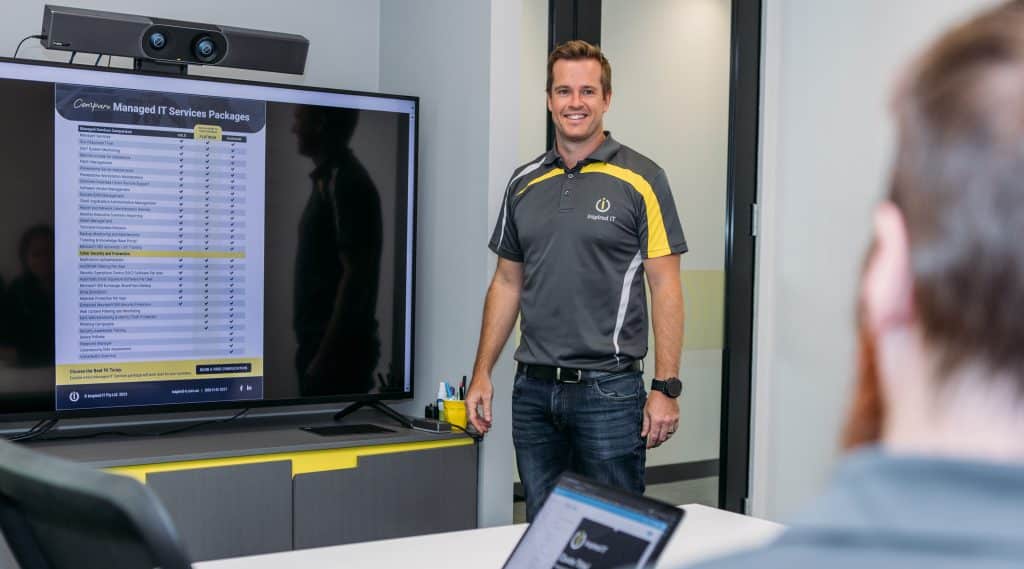
Owner operator of Inspired IT, Matt Seeds, running through an internal service meeting presentation with his team

Stay Aware of Common IT Strategy Problems

Concentrating on Tactics Above Strategy

A major mistake in any strategic planning is being engrossed in the tactical aspects required to realise the strategy rather than focusing on the broader picture.

A business must maintain a high-level perspective; it can set tactical goals, but it must not become so focused on what the IT department is doing that it loses sight of the big picture.

Your IT Strategic Plan is Set in Stone

One major flaw in strategic planning is that your strategy must conclude at the specified time. But then what? A strong IT strategic plan evolves and iterates over time; it is not a one-and-done thing.

A one-time plan like this gets a business to a particular point but does not take it any further. The firm can alter its plans as its goals change by remaining dynamic, updating the planning regularly, and fostering change and progress.

Absence of Obvious Ownership

The IT department is not an island unto itself.

You’ll be losing out on a simple approach to enhance the operations of your organisation if you view the IT team as a separate creature with its objectives and requirements. In truth, a cogent merger of IT strategy and business strategy can boost firm performance.

Senior management wants to hear from the IT department. But before they may hear, they must first listen. As a result, it’s critical to include key members of the leadership team in discussions about how technology may assist the organisation in achieving its objectives.

Without this involvement and buy-in, senior leadership will be unable to keep track of the status of IT projects or their synergies with company-wide efforts.

IT is Constantly Changing

There is no space for adaptation or error in a rigid IT strategy plan. Any departure from the plan and objectives is viewed as a failure. Even worse, it indicates that the IT strategy itself is out of step with organisational objectives. A strategy plan that ignores the fact that no one can predict the future with absolute certainty is destined to fail from the outset.

Your IT’s Worth is Not Fully Appreciated

While IT is used by individuals at all levels, recognising the underlying value of IT and how it helps a company succeed in the current world is often missed. As a result, it is critical that all business executives and key stakeholders involved in the planning stage, not just the IT leaders, understand the business value that IT provides to the organisation.

This is essential in delivering a strong IT strategic plan. This direction must come from the top, be understood and implemented by the Executive team, and include business leaders at all levels.

The Components of an Effective IT Strategy

Robust IT strategic planning enables a company to lay out the technology investments needed to accomplish key business objectives. It enables the company to map out the resources required to drive its transformation project, as well as identify the goals and metrics for success.

A solid IT strategic planning process, when handled properly, will deliver:

A big-picture vision of the business

Both now and in the future. What does success look like at each stage, and how does it happen? What is going on around these goals to ensure they are met?

A strategically sound point of view

It takes a long-term perspective to assist the business in its IT journey, while also connecting with other business plans and strategies to help fulfil organisational goals and objectives. Rather than becoming caught down in the tactical operational aspect of the company strategy, it is visionary and high-level.

Disruption control

Strong IT strategic planning can at least have contingencies in place for different sorts of interruption, with actions and plans on how to manage it. The business may not always plan out specific disruptions that they’ll face. Few companies could have predicted the occurrence of a global pandemic, but those that had a thorough IT strategy in place would have been prepared should employees need to work from home.

Consistency across business platforms

While not particularly addressing individual platforms and apps, a solid IT strategic plan enables the business to detect and manage shadow IT concerns. For those who are unaware, shadow IT is the addition of non-approved tools and software to the business complement without the express authority of the IT department. This can be a problem in larger organisations because it implies different teams and departments are using different technologies, which can cause communication and collaboration issues.

Flexibility

A solid IT strategic plan is dynamic and has the flexibility to adapt as the business environment changes. Business IT leaders frequently review it, make adjustments, and alter it to ensure that it stays aligned with the goals and objectives of the company. As a result, it is constantly changing. When done properly, it updates the future as the business peeks further and further into the future, changing even the definition of what the future will look like.

Comprehensive communication

Strong IT strategic planning is only useful if business leaders are on board and understand what is involved. A high-level IT strategic plan that is presented to and understood by your Executive team guarantees that it is included in business planning and strategy.

IT strategy can then be disseminated throughout the organisation, ensuring that IT strategy is incorporated into business decisions at all levels.

Cloud-First Strategy

Begin migrating your applications to the cloud that best serves your business needs. Once you’ve migrated them to the cloud, it’s critical to monitor and change them to meet your performance and cost requirements. When determining where to host your workloads, various aspects must be considered, including data sovereignty, legislation, and organisational competence. Each of these can have an impact on the decision-making process, so it’s critical to consider all choices before making a final choice.

Government Agencies’ Specific Strategic IT Requirements

Government organisations have the unique challenges of being both service providers and operations organisations. Governments are responsible for managing and providing public services, and they also require massive information vaults to function successfully.

Many commercial organisations are concerned about security, and when it comes to government IT security, those concerns are compounded. Over the last few years, the Federal Government has been the source of numerous secret material leaks that have been both frequent and destructive.

Government departments must be progressive in the process through which their data is created, communicated, processed, and kept to increase data security, as their profile makes them a high-priority target for hackers.

Data security must be a cornerstone of a five-year government IT strategy plan.

Having Difficulty Implementing a Successful IT Strategy?

Your company’s five-year goals are more than mere milestones; they are the roadmap to innovation, growth, and technological excellence. IT strategic planning is not just about keeping pace with technology; it’s about leveraging it to propel your business forward. Are your strategic objectives aligned with tangible business outcomes? Is your IT department fully integrated into your strategic vision?

At Inspired IT, we don’t just assist with technology alignment; we partner with you to craft a vision that resonates with your long-term success. We understand that every business is unique, and our tailored IT strategic planning services are designed to fit your specific needs and aspirations.

Ready to transform your IT strategy into a powerful engine for growth? Contact Inspired IT today, and let’s embark on a journey to shape your next five years with clarity, confidence, and innovation.


What is an IT Consultant?

What is an IT consultant? It’s a question many businesses find themselves asking as they navigate the complex world of technology. An IT consultant is more than just a skilled professional offering expert advice; they are a vital partner in shaping the technological landscape of a company. Whether working as an independent contractor or part of a consulting firm, IT consultants bring a wealth of knowledge and experience to help businesses thrive in an ever-changing digital environment.

We understand the critical role that IT consultants play in driving innovation and success. From assessing current technology infrastructure to implementing cutting-edge solutions, our team is committed to providing the tools and support you need to excel. In this article, we’ll explore the different types of IT consultants, the advantages and disadvantages of hiring one, and how they can transform your business. Join us as we delve into the dynamic world of IT consulting, where technology meets strategy, and inspiration leads to growth.

IT consultant working with client

Types of IT Consultants

IT consultants advise individuals and businesses on technology purchases and strategy decisions, as well as on how to solve technological problems. A Business IT consultant can serve as a virtual CIO temporarily, providing expert advice on IT strategy to a company that lacks high-level IT expertise in-house.

 Value-Added Resellers (VARs)

Nowadays, it is common for IT consultants to work for value-added resellers (VARs), systems integrators, and other service providers who offer consulting services as a component of a more extensive portfolio of products and services.

When implementing a new ERP system, an organisation may decide to work with an IT consultant suggested by the vendor rather than train current staff members in-house or bring on new hires who would be unnecessary once the system was implemented.

VARs and consultants occasionally work together on sales engineering projects. This kind of consultant examines the client’s present technological or business needs and offers products, services, or other IT solutions that can meet those needs.

System Integrators

Systems integrators, like MSPs, also find great value in employing IT consultants. These professionals are often brought on board to conduct a thorough assessment of a client’s business and technological challenges. But their role goes beyond just identifying issues. They delve into the intricacies of the business, understanding its operations, goals, and pain points.

IT consultants working with systems integrators don’t just spot problems; they uncover opportunities. They look for areas where process optimisation can drive efficiency and productivity. They identify ways in which technology can not only solve existing challenges but also propel the organisation towards its strategic objectives.

But their role doesn’t end with making suggestions. IT consultants also help implement these technological solutions, ensuring they are integrated smoothly into the business’s existing systems. They provide ongoing support, helping the organisation adapt to the new processes and technologies.

Managed Services Providers (MSPs)

Managed Service Providers (MSPs) play a crucial role in the IT landscape, particularly for small businesses. These businesses often lack a dedicated IT department, making MSPs their go-to resource for IT support. However, the technical nature of IT services can sometimes create a communication gap between MSPs and their clients. This is where IT consulting strategy comes into play.

IT consulting strategy serves as a bridge between the technical services offered by MSPs and their often non-technical clients. It’s about translating complex IT concepts into language that businesses can understand and utilise. This strategy is particularly important for MSPs, which are frequently founded by technicians and engineers who have a deep understanding of IT but may struggle to communicate this knowledge to non-technical clients.

By employing IT consultants, MSPs can ensure that their clients not only receive the IT support they need but also understand the value and impact of these services on their business. Consultants can assist clients with IT planning and project management, helping them make informed decisions and get the most out of their IT investments.

In essence, IT consulting strategy is about more than just providing IT services; it’s about empowering businesses to leverage technology effectively and strategically.

cyber security specialist with a client

Specialisations within IT Consulting

In the realm of IT consulting, professionals often carve out niches to provide the most effective solutions to their clients. These specialisations span various areas, each addressing unique aspects of technology and business needs.

IT Security

Another critical area of specialisation is IT security. With the rise in cyber threats, businesses need experts who can safeguard their digital assets. IT security consultants conduct a comprehensive analysis of a company’s existing security infrastructure, identifying potential risks and weak points that could be exploited by malicious entities. They pinpoint specific vulnerabilities within the system, including examining firewalls, encryption methods, access controls, and other security measures.

Based on the identified risks and vulnerabilities, IT security consultants develop tailored strategies to strengthen the company’s security posture. This may involve implementing new security technologies, updating existing protocols, or training staff on best practices. Ongoing monitoring and support are often provided, along with guidance on compliance with relevant data protection laws and standards.

Preparing for potential security incidents is also crucial, and consultants can assist in creating an incident response plan. By leveraging the expertise of IT security consultants, businesses can create a robust and resilient digital environment, building trust with customers and stakeholders, and ensuring that valuable assets are protected

Cloud Computing

One such specialisation is cloud consulting. As businesses increasingly migrate their operations to the cloud, the need for experts in this domain has skyrocketed. Cloud consultants guide businesses through the complexities of cloud technology, helping them select the right cloud platforms, implement cloud solutions, and manage their cloud infrastructure.

Cloud consulting is an example of specialisation within the cloud. A consulting firm may specialise in a particular cloud platform, such as AWS, Google Cloud, or Microsoft Azure. A consulting firm may also specialise in one or more SaaS providers, such as Salesforce and ServiceNow.

Information Governance

Information governance is another key specialisation within IT consulting. As businesses generate and handle vast amounts of data, managing this information effectively becomes crucial. Information governance consultants help businesses develop and implement policies and procedures for managing information throughout its lifecycle. They work closely with organisations to understand their unique data needs, regulatory landscape, and business goals.

The process begins with an assessment of the current information management practices, identifying areas where improvements can be made. This includes evaluating how data is collected, stored, accessed, and disposed of, ensuring that each stage aligns with legal and ethical standards. Information governance consultants also focus on data quality, ensuring that the information used in decision-making is accurate, consistent, and timely.

Privacy is another critical aspect of information governance. Consultants help businesses comply with various privacy regulations, such as GDPR, by implementing controls to protect personal and sensitive data. This includes defining who has access to specific information and putting measures in place to prevent unauthorised access or disclosure.

Records management is also a vital component of information governance. Consultants assist in developing policies for retaining and disposing of records, ensuring that businesses keep essential documents for the required period and securely destroy them when no longer needed.

Data architecture and integration are often addressed as well, ensuring that information flows smoothly across different systems and platforms. This involves creating a cohesive structure that allows for efficient data sharing and collaboration within the organisation.

E-Discovery

E-Discovery, or electronic discovery, is a specialisation that’s particularly relevant in the legal field. When legal disputes arise, relevant data must be identified, preserved, collected, processed, and reviewed. E-Discovery consultants guide businesses through this complex process, using specialised software and techniques to find and retrieve digital data. They help businesses manage their electronic information in a way that’s efficient, cost-effective, and compliant with legal requirements.

Compliance

Compliance is a critical area of specialisation within IT consulting. As businesses operate in an increasingly regulated environment, ensuring compliance with laws, regulations, and industry standards becomes essential. Compliance consultants help businesses understand their compliance obligations and implement systems and processes to meet these requirements. They cover areas such as data privacy, cybersecurity, and industry-specific regulations. By ensuring compliance, these consultants help businesses avoid legal issues, fines, and damage to their reputations.

IT consultant assisting a client with their IT system.

Related Consulting Specialties

IT consulting may overlap with other types of consulting. Management and strategy consultants, for example, may be able to provide expert advice on a variety of business issues. When it comes time to automate those processes, management consultants who work with clients to redesign or implement new business processes may make IT recommendations.

IT may eventually supplant management consulting as the primary business of a company. Indeed, management consulting divisions of the former Big Eight accounting firms spawned IT consulting firms such as Accenture.

A supply chain consultant, in a similar manner, may initially focus on a client’s inventory and vendor management issues but may later become involved in IT, such as the implementation and integration of ERP and supply chain systems.

Ready to Leverage the Power of IT Consulting?

Navigating the complex world of IT can be daunting, but you don’t have to do it alone. At Inspired IT, we’re here to guide you every step of the way. Our team of expert IT consultants brings a wealth of knowledge and experience to the table, helping you leverage technology to drive your business forward.

Whether you’re looking to adopt new technologies, improve your IT infrastructure, or navigate the intricacies of information governance, e-discovery, or compliance, we’ve got you covered. We offer flexible, cost-effective IT consulting services tailored to your unique business needs.

Don’t let IT challenges hold you back. Contact Inspired IT today and let us help you harness the power of technology to achieve your business goals.

Essential Eight Mitigation Model: The Cybersecurity Plan You Should Adopt

Cyberattacks are more common than ever, and they are becoming stealthier. A single breach can jeopardize your company’s operations.

Simple anti-virus software and a firewall were enough to stave off the bad guys in the early days of the internet. The moment has come to pull out all the stops and implement a mitigation strategy to safeguard your data from cybersecurity threats.

The Australian Cyber Security Centre (ACSC) created the Essential Eight framework to help businesses create effective cybersecurity plans for the mitigation and prevention of cyber security incidents. They encourage Australian firms to use this strategy to make it more difficult for cybercriminals to compromise their systems.

Using the Essential Eight methodology, you can survive both little and major cyber security catastrophes. In this article, we’ll discuss the Essential Eight concept and how it applies to your cyber security strategy.

The ACSC’s Essential Eight Mitigation Model

1. Patch Application

Patches, also known as software upgrades, are critical for safeguarding your IT infrastructure. IT “patches” are known security flaws in apps and operating systems.

It is critical to understand that software evolves and new vulnerabilities are discovered all the time, and it is your responsibility to stay current.

It is the responsibility of software vendors to ensure that their products meet high-level security requirements and are rapidly updated to safeguard consumers. It is your responsibility to apply those patches.

Install patches as soon as they become available. Patches will make cyber dangers less severe.

2. Application Control

Application controls are put in place to stop harmful applications from executing on your IT infrastructure. By creating an enable list, you can control particular programs that are essential for managing your organization. Anything else, whether good or terrible, is suppressed.

This will prevent harmful software like viruses, worms, and trojans from wreaking havoc. On the other side, you may also compile a list of applications that you want to use exclusively in a network.

If properly implemented, you will have fewer chances of a data breach caused by infected applications (especially if they are downloaded from untrusted sources).

However, application control is a large task that will necessitate careful consideration of which applications to block and approve because it will block everything, not just the bad stuff.

3. Application Hardening

Hackers gain access to your system using a variety of applications. Web browsers, Microsoft Office, Adobe, and Java are among the most popular. You can prevent these attacks by limiting the types of applications that can run on your system. This is the purpose of application hardening.

Application hardening limits the computer capability of an application. The network administrator can configure the application’s many options, such as user control and system access. This mitigation step is critical for preventing malware spread.

Start by reviewing the features of your most commonly used software. Decide which elements are necessary for your operations and which are not, and then go forward. To lower your risks, identify the users who use programs like Adobe Flash and Java and carefully restrict them.

Once established, review your application hardening tasks regularly because attackers could find software bugs you are not aware of. Speak with your IT employees or Managed Service Providers to learn more about penetration testing and IT health assessments.

4. Microsoft Office Macro Settings

Macros are powerful tools for automating routine tasks. It is a set of hidden instructions designed to boost productivity.

Although this appears to be a good thing, Macros, especially shady ones, can contain malicious code, putting you at risk of a cyber security breach right under your nose. They can easily dupe users (particularly non-technical ones) into using infected macros, allowing them to hack into your system.

Office macros are sneaky, and you must be careful not to let malicious ones infect your network.

One of the most effective mitigation strategies is to only run Microsoft Office macros from trusted locations (if one or two of your operations require macros to execute tasks) and disable all other unused macros.

5. Hardening The Operating System

Operating systems, like Microsoft Word and Adobe Photoshop, must be hardened for the same reason: to “patch” any security flaws in applications and operating systems. If your operating system is out of date, you are vulnerable to cyber-attacks. And if this happens, you are allowing hackers to take advantage of your IT.

You must apply the patches as soon as your software vendor makes them available. If you’re using Windows, go to Settings and then Update and Security. You can then check to see if you’re up to date and if any updates are available. Also, remember to restart your computer regularly so that new or pending updates can be initiated.

You can also enable automatic updates to ensure that you always receive the most recent updates without having to check your Windows settings.

6. Limit Administrator Access

To properly mitigate and prevent cyber-attacks on your IT system, admin access should be limited. Organizations typically set up their IT in the same manner that they set up their organizational hierarchy.

Typically, decision-makers have more privileges than interns. Access to sensitive company information should not be easy for everyone in the organization; doing so jeopardizes your company’s operations. One of them exposes you to online threats such as ransomware.

Be selective about who you provide system administrator rights to. Giving a person admin access gives them access to the most important resource in your business.

After granting admin access, systematically monitor each user and check in regularly to see if their access is still required for them to do their job. If they do, keep them. If not, revoke their access rights.

This task should be completed every three to six months.

7. Multi-Factor Authentication

We cannot overstate how many cyber-attacks have been deterred by multi-factor authentication. Hackers know how to get your login information. They can even buy your login information on the Dark Web. As a result, multiple layers of protection are required to prevent attackers from accessing your data.

Multi-factor authentication is a security feature that prevents unauthorized individuals from gaining access to your device, accounts, or network. Because it makes it much more difficult for hackers to access your data, it is widely regarded as one of the last lines of defence against attacks.

The ACSC included multi-factor authentication in their Essential Eight in combating cyber security issues because of its efficiency in preventing attacks using compromised login credentials, which is now the most common way hackers obtain access.

As previously stated, hackers can easily obtain your login credentials if you use the same logins for all of your online accounts. Even if you use the same logins on multiple accounts, your data is still secure due to an additional layer of protection that verifies whether or not it is you attempting to log in to your account.

We understand how inconvenient it is to be required to enter a series of codes after logging in, but it is a small price to pay to keep your data safe. Check with your IT department or Managed Service Provider to see if multi-factor authentication is enabled on all of your corporate online accounts.

8. Backup Your Data Regularly

Backups will come in handy if all seven of the Essential Eight controls fail. If your systems have been compromised, you can quickly restore them by replacing all corrupted files with backups. Finally, having a backup will help you avoid losing everything, from your reputation to your profits.

It’s best to implement and maintain a backup strategy that stores a copy of your files in a secure location so that if you’re ever attacked (especially by ransomware), you can simply restore your environment as if nothing had happened.

It is best to consult with your IT team or Managed Service Provider about your backup strategy. Determine what data must be backed up, how frequently it must be backed up, and who should have access to those backups.

Does Your Company Follow the ACSC’s Essential Eight Mitigation Model?

This article’s completion brings you one step closer to a more robust cybersecurity strategy. You now understand how each Essential Eight Model control can protect your organization from major or minor cyber incidents.

If you want to improve or implement a cyber security solution in your Australian business, you’ve come to the right place.

Please contact Inspired IT experts to find out how our cyber security experts can help you implement the Essential Eight model and improve your IT security.

Which Form of MFA Is the Most Secure? Why is MFA Important?

Credential theft is now at an all-time high and is responsible for more data breaches than any other type of attack.

With data and business processes now largely cloud-based, a user’s password is the quickest and easiest way to conduct many different types of dangerous activities.

Being logged in as a user (especially if they have admin privileges) can allow a criminal to send out phishing emails from your company account to your staff and customers. The hacker can also infect your cloud data with ransomware and demand thousands of dollars to give it back.

How do you protect your online accounts, data, and business operations? One of the best ways is with multi-factor authentication (MFA).

It provides a significant barrier to cybercriminals even if they have a legitimate user credential to log in. This is because they most likely will not have access to the device that receives the MFA code required to complete the authentication process.

Two factor authentication padlocks concept

Why is MFA Important?

Enhanced Security: MFA adds an additional layer of security to the standard username and password model by requiring users to provide at least two forms of identification before access is granted. These could be something you know (like a password), something you have (like a mobile device), or something you are (like a fingerprint). This makes it significantly harder for unauthorised users to gain access to your data.

Protection Against Phishing and Other Cyber Attacks: Even if a cybercriminal manages to obtain your password, they would still need a second form of authentication to access your account. This makes MFA a strong deterrent against phishing attacks, keylogging, and other forms of cybercrime.

Regulatory Compliance: Many industries have regulations that require companies to use MFA to protect sensitive data. Implementing MFA can help your business stay compliant with these regulations and avoid potential fines or penalties.

Building Trust with Customers: By implementing MFA, you’re showing your customers that you take their security seriously. This can help build trust and strengthen your relationships with them.

Reducing the Impact of Password Reuse: Many people reuse the same password across multiple accounts, which can lead to multiple accounts being compromised if one gets hacked. MFA reduces the risk associated with password reuse by adding an additional layer of security.

What Are the Three Main Methods of MFA?

When you implement multi-factor authentication at your business, it’s important to compare the three main methods of MFA and not just assume all methods are the same. There are key differences that make some more secure than others and some more convenient.

Let’s take a look at what these three methods are:

1. SMS-based

The form of MFA that people are most familiar with is SMS-based. This one uses text messaging to authenticate the user.

The user will typically enter their mobile number when setting up MFA. Then, whenever they log into their account, they will receive a text message with a time-sensitive code that must be entered. 

2. On-device Prompt in an App

Another type of multi-factor authentication will use a special app to push through the code. The user still generates the MFA code at login, but rather than receiving the code via SMS, it’s received through the app.

This is usually done via a push notification, and it can be used with a mobile app or desktop app in many cases.

3. Security Key

The third key method of MFA involves using a separate security key that you can insert into a PC or mobile device to authenticate the login. The key itself is purchased at the time the MFA solution is set up and will be the thing that receives the authentication code and implements it automatically.

The MFA security key is typically smaller than a traditional thumb drive and must be carried by the user to authenticate when they log into a system.

Now, let’s look at the differences between these three methods.

Most Convenient Form of MFA?

Users can often feel that MFA is slowing them down. This can be worse if they need to learn a new app or try to remember a tiny security key (what if they lose that key?).

This user inconvenience can cause companies to leave their cloud accounts less protected by not using multi-factor authentication.

If you face user pushback and are looking for the most convenient form of MFA, it would be the SMS-based MFA.

Most people are already used to getting text messages on their phones so there is no new interface to learn and no app to install.

Most Secure Form of MFA?

If your company handles sensitive data in a cloud platform, such as your online accounting solution, then it may be in your best interest to go for security.

The most secure form of MFA is the security key.

The security key, being a separate device altogether, won’t leave your accounts unprotected in the event of a mobile phone being lost or stolen. Both the SMS-based and app-based versions would leave your accounts at risk in this scenario.

The SMS-based is actually the least secure because there is malware out there now that can clone a SIM card, which would allow a hacker to get those MFA text messages.

A Google study looked at the effectiveness of these three methods of MFA at blocking three different types of attacks. The security key was the most secure overall.

Percentage of attacks blocked:

  • SMS-based: between 76 – 100% 
  • On-device app prompt: between 90 – 100%
  • Security key: 100% for all three attack types

What’s in Between?

So, where does the app with an on-device prompt fit in? Right in between the other two MFA methods.

Using an MFA application that delivers the code via push notification is more secure than the SMS-based MFA. It’s also more convenient than needing to carry around a separate security key that could quickly become lost or misplaced.

Looking for Help Setting Up MFA at Your Company?

Multi-factor authentication is a “must-have” solution in today’s threat climate. Let’s discuss your barrier points and come up with a solution together to keep your cloud environment better secured.


—
Featured Image Credit

This Article has been Republished with Permission from The Technology Press.

How OneNote Can Streamline Team Collaboration (And Four Tips to Make the Most of This Program)

OneNote is a digital note-taking tool that comes with plenty of benefits for users. But what you may not have realized yet is how powerful this app can be for enhancing team collaboration.

Note-taking.

This is an essential part of day-to-day operations for many business owners, managers, and teams. After all, people can’t rely on their memory alone to recall everything that gets talked about each day. Especially when it concerns important matters.

When it comes to note-taking, traditional methods such as pen and paper are effective but take too long. But modern-day businesses need something that allows them to work faster. That’s why they opt for digital solutions like OneNote.

OneNote is a productivity tool that leverages cloud and Microsoft technologies to make information capturing, storage, and sharing a breeze.

Think of OneNote as a hub for all notes that allows you to organize them in many ways. It even allows pinning multimedia documents next to simple text.

So, if you’re looking for a robust digital note-taking tool, OneNote may be the solution for you.

Keep reading to discover the numerous ways in which this tool can be helpful for you and your business.

Why Should You Rely on OneNote?

OneNote is not just a powerful tool for note-taking. It’s also a useful tool that allows you to perform various functions for easy information processing.

Some of its main benefits include:

BENEFIT #1. PROMOTING REAL-TIME COLLABORATION

OneNote is part of Microsoft’s fully-cloud based Office 365 suite. This means OneNote users can share files with other team members or clients in real-time. Multiple people can view and edit their notes simultaneously, allowing for a seamless collaboration anytime.

A great thing about real-time editing is that you can track all changes to the file. You can even restore the previous version of a document in case of accidents.

Businesses that run in multiple locations can benefit from this feature as well. It’s because people located across the country can work on the same project without affecting team collaboration.

Simply put, there’s no need to trade emails and waste time waiting for responses – managers can have an easy time collaborating with their team instantly without ever leaving the office.

BENEFIT #2. SECURING SENSITIVE INFORMATION

Doing business online and sharing sensitive data comes with security risks. This is especially true for notebook software. Fortunately, OneNote comes with a set of security features that protect your data from being exposed to third parties.

For example, you can lock specific sections with passwords while having all your information secured with 3DES encryption at all times. And if your password-protected documents remain inactive for a long time, the software will automatically lock them to prevent data leaks.

BENEFIT #3. INTEGRATION WITH OTHER SOFTWARE

Like other Office 365 suite apps, OneNote has great integration abilities. You can sync your OneNote with Outlook to send email information directly to the app and vice versa.

What’s more, you can integrate this software with non-Microsoft apps as well. Some notable plugins include Zapier, Slack, Trello, Evernote, Dropbox, Salesforce, and many others. And all your essential apps will be synchronized, allowing your team to be more productive each day.

BENEFIT #4. PROJECT MANAGEMENT

OneNote has dozens of uses for general business. However, it’s especially suitable for project management.

Project managers often deal with issues such as team member misunderstandings, communication delays, or project bottlenecks. But thanks to Microsoft’s note-taking tool, many of these issues are quickly alleviated.

Project management can become more straightforward. It’s because OneNote makes it easy for the manager to track each team member’s achievements. They can update timelines, check off completed tasks, or assign new ones with ease.

TAKE ONENOTE TO THE NEXT LEVEL

If you have never used OneNote before, you may be interested to learn about some tips to help you get the most out of the software..

TIP #1. CREATING QUICK NOTES

Quick Note is a great feature that lets you write down a thought when you’re out having lunch or away from the office.

Imagine being in the store and remembering you haven’t responded to an important email. You can take your phone, open the One Note app, and create a Quick Note reminding you of this task.

The next time you open OneNote on your computer, you’ll see the message there.

This feature is similar to Sticky Notes, as it lets you jot down any idea or thought in a matter of seconds. All your notes will be saved in the “Unfiled Notes” section of your “Quick Notes” notebook, a place where all your notes are saved by default.

TIP #2. SEARCHING ACROSS ALL NOTES

Searching for notes becomes more challenging as time passes. If you’re an active user, you can find yourself storing hundreds of notes in a matter of months. But don’t worry, as there are tons of options to organize your notes as well as search for it.

OneNote has a built-in search option to make note finding easier.

All you need to do is click on the magnifying glass or hit “Ctrl” (or “Command” for Mac) + “F” on your keyboard and look for a phrase or word. The software will go over all your typed, handwritten, and even picture notes.

You can further narrow the search by selecting the drop-down arrow and choosing the desired option. You’ll see all matching results highlighted in your notes.

As you find the note you needed, you can close the search by pressing “X” on the right-hand corner

TIP #3. USING PRE-MADE TEMPLATES

OneNote is designed to have a blank canvas for each new note. And it’s what gives users a whole lot of flexibility. However, you can find this approach to be too basic sometimes. So, why not add some style, structure, and colour to the app?

Thankfully, there are tons of pre-made templates to choose from. You can download a template with decorative backgrounds, to-do lists, planners, and more.

Note that you can use the templates only on new OneNote files. The ones that already contain text won’t work since most designs require content to appear in a specific place on the page.

If you need to add a template to your existing note, simply create a new one, then copy the existing text over.

TIP #4. SCANNING DOCUMENTS FROM YOUR SMARTPHONE

Do you need to take notes from a scanned document? That’s not an issue for OneNote. You can use the Microsoft Lens: PDF Scanner App (available for Android and iOS) to take high-quality scans of multiple documents using your phone and upload them to OneNote.

BECOME THE MASTER OF NOTE-TAKING

Digital note-taking tools have helped thousands of workers and managers become more productive. OneNote is one such software that seems to have it all – abundant features, flexibility, and ease of use.  At Inspired IT we are HUGE users of OneNote across all our departments and link this into teams.

Whether you’re a business owner who wants to boost your team’s performance or a project manager that needs better tracking of the project timeline, OneNote has something in store for everyone.

If you’d like to learn more about how this powerful tool can help you make your business better, feel free to reach out to us. We can have a 10-15-minute chat about this topic or speak to your Client Relationship Manager and they will be happy to assist.