If you're interested in our IT services, & what we can do for your company please complete the form below. If you're looking for support with your current services please head to the Contact page.
Please note, the free consultation does not include an assessment.
At Inspired IT we value our relationship with our clients and strive to continually improve on our service, which is why we have recently brought in a new Client Relations Manager. Marith Roelofs is the voice of our clients within our business, so while our technical team are busy focused on the tasks at hand, she is free to dedicate her time to ensuring that you as our client get the best possible standard of service.
Marith is fully trained and highly experienced in creating a proactive client relationship to ensure
you are kept well informed throughout your journey. She is our “go to” person when a client has an initial query and can escalate urgent matters when time is critical. We created this role because we recognise how essential an efficient IT system is within a business. Even minor glitches in the network can jeopardise efficiency, so we have made Marith our primary point of contact. This way she can ensure essential IT services are maintained to our high standards.
Our Client Relations Manager is also there to help identify any gaps within clients’ businesses and can liaise with our expert technical team to discuss suitable options to address these and then feed the options back to clients to find the ideal solution. Marith is always working to add value for our existing clients so you get the best possible value out of our service. This is why she schedules monthly conversations to ensure there are no outstanding or reoccurring issues.
Inspired IT is dedicated to client satisfaction and our contractual requirements to our customers are as important to us as they are to you. Marith monitors these commitments as well as managing all projects. She takes the steps needed to improve the overall experience for our clients and when necessary adapts the project to better meet the existing and future needs. There are plenty of occasions when a current contract needs to be upgraded or adapted to meet the changing requirements of a business.
Our clients do not always want an in-depth technical explanation of the change to their service so Marith liaises with our team of IT technicians to talk through options. As our Client Relations Manager she has adopted the role of IT translator, to talk through what these changes mean for you and your business using language you are familiar with. The IT world can seem an unfathomable maze to business owners which is why she is trained to explain the options clearly. Your IT experience with us is not a static one and just as your business expands and evolves, so does the service we offer you.
Inspired IT’s team will continue to develop and adapt to enhance customer experience and ensure your business has the an efficient IT system in place. It does not take much in the way of a technical problem to bring a business to a temporary halt or to impact negatively on productivity. Thanks to our Marith, our latest addition, she can quickly step in to troubleshoot any issues and act as the go between so our technicians are straight onto the case.
At Inspired IT we take the stress out of technical issues so you as a business owner are free to do what you do best, which is run your company and achieve optimal services to your own clients.
While COVID-19 has dealt a devastating blow to economies across the world it has also created a whole new work ethos and proved that while offices have their purpose, a fair proportion of companies can continue to run at optimum efficiency with a remotely based workforce. The pandemic has created a new norm for millions of people worldwide who have thrived on the opportunity to set up a temporary office in their own home. Business owners were given no choice but to place their trust in their staff to remain motivated without supervision and leave workers to their own devices.
There are obvious advantages to the home office environment as staff do not have the opportunity to interact and become distracted. Most of us use our office as a place to socialise to some degree with fellow colleagues but remove this element and you have a focussed staff member who is free to concentrate on the job at hand.
Using Microsoft 365
For those companies without Microsoft 365 the transition to a remote workforce was far from smooth as the transferring of documents to an online server was not something that could be completed overnight. The delays in setting up an online database through Microsoft 365 and familiarise staff with Microsoft Teams to allow collaboration to continue, resulted in costly downtime. Cross to the Netherlands and there you will find a pre-existing infrastructure where 14.1 percent of the workforce regularly work from home. The Dutch have the advantage of having 98 percent of homes with high-speed internet access whereas here in Australia and in many other countries, the sudden office shut down forced by the coronavirus created significant issues. The sale of internet dongles skyrocketed and staff struggled under the pressure to get data online overnight.
A recent US poll showed nearly 60 percent of remote workers would like to continue to work from home as much as possible once the coronavirus restrictions on workplaces are removed. In Australia surveys have shown many staff have thrived on the new remote working culture and are deep in negotiations with their managers to see if a more flexible work schedule can be adopted on a permanent basis, as it is in the Netherlands. Surveys show a significant proportion of people would like the opportunity to work from home two to three days per week while business owners have been asking themselves whether their expensive city centre office space is actually needed.
Collaboration
The ease of sharing data through Microsoft 365 during this global pandemic has helped companies realise they can reduce their huge overheads associated with office complexes and that they do not need to monitor staff throughout their working day to ensure productivity is maintained. The Dutch culture of trusting staff enough to provide a flexible work schedule has paid dividends and it also leads to a happier, more motivated workforce with higher levels of retention.
The global shift to remote work will have a long lasting imprint on the working culture worldwide and it will be interesting to see how many business owners continue to give their staff the credit they deserve and allow them to continue to work from home on at least a part time basis. Coronavirus enforced the trial run and proved efficiency and productivity do not collapse into an unrecognisable heap when staff members are trusted to manage their own time. The core of success though is sound IT infrastructure and with that in place many companies can reduce their overheads, cut down on office space and increase profit margins by allowing staff to enjoy a more flexible work culture. Covid-19 has created a new world for companies internationally and an opportunity to embrace an entirely new approach to how to ensure their business thrives in the future by placing a little more faith in the people they employ and the incredible efficiency and flexibility Microsoft 365 provides.
At Inspired IT our services are focused around Microsoft 365 and are able to help companies transition to the Modern Workplace. If you require some training check out our new M365 Resource Hub for Training Videos and M365 Updates
This morning waking up there was an announcement that the Australian Government would hold a special press conference in regards to a detection of a massive cyber attack from a ‘sophisticated, state-based actor’.
The details were a bit light however they mentioned that “This activity is targeting Australian Organizations across a range of sectors, including all levels of government, industry, political organizations, education, health, essential service providers and operators of other critical infrastructure’
Unsafe Global Network
This has always been a constant threat as anything connected to the internet or a network has the potential to be compromised.
The defence minister has urged that all Australian organisations take 3 stepts to protect themselves:
Patch all internet-facing devices promptly, ensuring that any web or email servers are fully updated with the latest software.
Ensure you always use multi-factor authentication to secure your internet access, infrastructure and also your cloud-based platforms
Become an ACSC partner to ensure you get the latest cyber thread advice to protect your organization online
At Inspired IT we have always taken security seriously. One of the reasons why we heavily use 365 is because of the ability to enable Multi-factor authentication and the ability to enable SSO across a host of other cloud-based platforms relative ease. Patching is also an important thing to check regularity such as your Operating System and all 3rd party products that you install.
Under Managed Services we take care of all of this for you.
A little while ago we produced a video on how to enable Multi-Factor Authentication which is still relevant now and can be found by clicking HERE
If you have any questions or concerns please email [email protected] and we will try and assist.
Imagine a world where we are all required to work remotely, either from home or satellite offices. This is a reality COVID-19 has created for people worldwide in recent months, with users of Microsoft Teams peaking at 75 million as head offices went into temporary hibernation, forcing the bulk of operations to be managed from multiple sources in different regions, States and countries. Thankfully, this huge shift to online coordination didn’t result in heavy disruption for those businesses which already had an efficient cloud-based technology in place. Their shift to a remote working climate was relatively seamless, thanks to the company’s data being stored online as opposed to being reliant on a database of documents stored on various laptops, PCs and office based files.
It was a very different story for those businesses whose data was effectively locked into onsite hardware; transferring files to OneDrive, SharePoint and setting up Microsoft Teams can’t happen overnight and the widespread lockdown had a catastrophic impact for many, with a drastic fall in productivity and profit.
SECURITY ISSUES AND HOW TO RESOLVE THEM Shifting from an office based to a cloud based environment naturally raises important security issues, with the threat of security breaches, phishing and financial fraud all a genuine concern. This is why Microsoft 365 allows the creation of a highly effective security barrier through Multi Factor Authentication (MFA) to ensure your data remains safe and untouched. MFA is free and easy to set up and adds an important level of security to passwords through the use of push notifications, biometrics, one-time passwords and two-step verifications using mobile phones. Security keys are another option and each of these will ensure there is no loss of sensitive data or the compromise of your company’s identity.
ENCRYPTED DATA Companies with staff working remotely can enjoy the benefit of encrypting all data through BitLocker and Distribution Key Manager. This includes data from Exchange Online, SharePoint Online, OneDrive for Business and all Microsoft Teams files. With Multi Factor Authentication your data is already safeguarded but it’s reassuring for business owners to know should a security breach occur a hacker cannot interpret the data illegally accessed.
MICROSOFT TEAMS At the height of this worldwide pandemic, Microsoft 365 and especially its Microsoft Teams application, have proved face to face meetings are not as essential as we previously thought. Efficient workforce coordination can be managed effectively online as it allows for secure virtual conversations and team meetings, a smooth exchange of data and effective collaboration. With instant access to online files, your staff teams can share and edit Word documents, PowerPoints and Excel files in real time. In many ways an online cloud-based set up is more accountable than an in-office one as all activity can be tracked and traced to its source, as opposed to the time-consuming task of physically locating a file, the individual holding it and any changes made.
AZURE INFORMATION PROTECTION (AIP) AIP is another cloud-based solution for added security. It provides an extra layer of protection by enabling documents to be classified and labelled by administrators who are free to define the rules and conditions. This prevents unauthorised access and allows for safe collaboration.
THE FUTURE Therefore, COVID-19, despite its widespread devastation, has opened up a new world of opportunity for businesses by highlighting the need for a cloud based operation, which will continue to bring endless benefits to company owners long after their staff have returned to the offices to work. Microsoft 365 should be a fundamental base for all business activity, empowering team members through the safe online sharing of sensitive data which is protected by impenetrable security. It may have taken a pandemic to force this sea change, but thanks to sound innovative technology, many companies will emerge the other side of the storm much better equipped to ensure their companies thrive in the future.
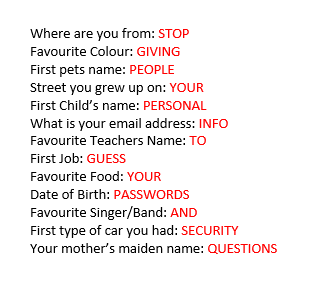
Who else has noticed the increased shares of info and games on Facebook. Something caught our eye recently and thought we would share and warn people around playing pure and innocent games
Any one recongnise or taken part in something like the below?
This is a sure-fire way to give up personal information on you and your multiple accounts that you have across the internet.
If you, your kids, your parents or your grandparents are a fan of these, please ask them to stop.
Inspired IT Offers Monitoring and Alerting of Stolen Digital Credentials, Increasingly Valuable Asset on Dark Web
Osborne Park, Western Australia – DATE October , 2019 – Inspired IT announced its new Dark Web monitoring services provided through its partnership with ID Agent, provider of Dark Web monitoring and identity theft protection solutions. With Dark Web ID, Inspired IT offers around the clock monitoring and alerting for increasingly compromised digital credentials, scouring millions of sources, including botnets, criminal chat rooms, peer-to-peer networks, malicious websites, bulletin boards and illegal black market sites.
“By bringing this product into our stack and in particular our Platinum Managed Service we are able to track and be alerted of security breaches. I am particularly excited by the Security Awareness Training and look forward to improving awareness around our client base” said Matt Seeds, Director at Inspired IT
The Dark Web is made up of various digital communities, and while there are legitimate purposes for the Dark Web, it is estimated that over 50 percent of all sites on the Dark Web today are used for criminal activities, including the disclosure and sale of digital credentials.
“Digital credentials such as usernames and passwords are widely used to connect to critical business applications – the reason these credentials are among the most valuable assets found on the Dark Web,” said Kevin Lancaster, CEO of ID Agent. “Unfortunately, the unaffordability of cyber offerings has played into the cyber poverty line experienced by small businesses. Dark Web ID, however, delivers an affordable model that provides small businesses with the same advanced credential monitoring capabilities used by Fortune 500 companies to organisations in the SMB and mid-market space.” Dark Web ID is the IT Channel’s premier commercial solution to detect customers’ compromised credentials in real-time on the Dark Web. It vigilantly searches the most secretive corners of the Internet to find compromised data associated with your customers’ employees, contractors and other personnel, and notifies them immediately when these critical assets are compromised. The data provided by ID Agent through Dark Web ID is the most trusted and validated available
Hey everyone my name is Matt Seeds and I’m the director of Inspired IT we specialize in Managed IT Services and Office 365 solutions. So today I want to talk to you about how to secure your Office 365 tenant. We see a lot of businesses that don’t have simple things enabled with in their 365 tenants so we have created five simple steps. So if you’re a business owner and you’ve set up your own Office 365 tenant and you don’t really know what to enable follow these five steps and it will really secure your data within your Office 365 tenant. Okay, I’m just gonna open up a demo tenant and login on the main 365 homepage. Then just logging in with the admin credentials for the demo tenant. All right, so we’re going to click on admin. And this is the new 365 tenant layout so I’ll demo in the new admin Center, we select show all. We select security. Then we select hunting. And click on start hunting for email and data. Once that loads down the bottom we’ve got search so expand search and then audit Log search. Once this loads up you’ll see that we have an option to turn on auditing. Sometimes it takes a little while to load but turn it on and then it will take a couple of hours to to enable. So once it’s enabled you can see from all the activities that we do in the tenant. like accessing files, checked out files, whose copied a folder, moved a folder, created a my item list, create an anonymous link. There’s so many activities that we can search and it’s really easy to do that. Once it’s enabled, so you can see it continues going on with the Azure AD Groups the role Administration activities, ediscovery activities, power bi activities, team activities which has been added recently and flow power-ups stream. So there’s so many easy things to look at now, and it’s so easy to do. Okay. So again, we’re logged in in the demo tenant. Click on admin. Then we expand users, active users, we can scroll down to our admin user. Or if you have a few sometimes easier to type it in so it’s just type in admin. Then select the little three dots and then edit user name so you can be as creative as you want. I’ve just put in a example. So let’s do demotenant and you click save. Now obviously before setting up this rule, we need to make sure that you’re not forwarding any emails externally there should be no reason why you are doing that. But if you are you might have to adjust this rule to suit your needs. So right in the tenant login as admin and then select admin. Select show all and then select Exchange. select mail flow and then you want to click on the + and then create a new rule. Let’s name then the rules something you can identify with. And then we want to expand and select more options and then select the sender “is external internal”. Let’s try that again. Select sender “is external internal” and then select inside the organization select the add condition button. And then select the message properties. And include the message type and then select auto forward. Click, okay. then we want to Select Do the Following. We want to select. Reject the message and then specify a reason so fill this out. what happens is if it gets Auto forwarded you’ll get a note with this info. So put whatever you want into it. Select okay And then there’s no over settings you need to do for this rile. It’s like save. And then that’s it. So as if there was a Phishing or someone was able to compromise your Office 365 tenant and set up an auto forward. The email wouldn’t be able to go out of your tenant. You’re able to run this up via Powershell as well. I’ve just gone and shown you the GUI way. But yeah, there’s ways that you can run this by PowerShell. If you want to know how to run it by PowerShell. Let me know and I will give you the command to run. Okay, and this video we’re going to change the tenant branding. This is a really good thing to enable so that your staff know that they’re entering their details into the correct 365 tenant. So let’s configure it. Okay, so login as admin and then select admin. select show all and select Azure active directory click on Azure active directory and then scroll down to where company branding is. Okay, and then what we want to do is select the file that you want. To display as your background. Obviously note the size the image limitations and also the logo that you want to display. So this is just a picture of a walk. I did over the weekend with my family and then there’s a logo with my laptop, will click save Just wait, for that to update. Enter the username then you can see that the background has been picked up. The logo hasn’t been picked up but I’ll show you on our tenant so you can see it looks like and there you go. That’s our tenant with our background and our logo. Okay, so next up. We’re going to enable MFA probably one of the most important things to enable and so easy to do through Office 365. So we want to log into the admin tenant as an admin and then select admin. We’re going to go to users and then select the user you want to enable MFA for, we are going to enable Megan on this test demo. And then select manage multifactor authentication. And then find Megan in this list here. And then select her and enable her, then select enable multi auth. Next when we logon as her. And we enter in the password. It will prompt with some more details. Okay, so we need more information required, select next. And then for this purpose, we’re just going to send a text to my mobile. I will hide my mobile we just need to confirm this mobile number. I have that and I will just enter that details now now. select verify and that’s two Factor authentication setup. So it’s really easy to enable obviously that’s only authenticating via mobile. I recommend installing the Microsoft authenticator app. It’s a slightly different process, but it’s really self-explanatory. enable that for all your staff. So those are the five things that I recommend to enable with your 365 tenant, so they’re really straightforward and it will really increase your security within your your tenant. So please install those and get those set up.
It’s a vulnerability in the Remote Desktop Protocol (RDP) that can affect Server 2008, Server 203, Windows, XP, Windows Vista and Windows 7. If you do not act on this vulnerability, then you are leaving the door open for criminals to modify data, delete data, access data and install malware.
What Action should I take?
You SHOULD not be running these systems now however if you are and in business, the environment HAS to look at moving off these platforms ASAP. I wrote an article earlier in the year that Windows 7, Server 2008 and Office 2010 are End of Life (EOL) in 2020 and as I write this there are only 138 days until 1st January.
To remind you again of the dates:
Windows 7 – End of life on January 14th 2020
Server 2008 and Server 2008R2 – End of life on January 14th 2020
Exchange 2010 – End of life on January 14th 2020
End of Life on October 13th 2020:-
Office 2010 – October 13th 2020
SQL Server 2008 and SQL Server 2008R2 – July 9th 2019
The link to the article I wrote at the start of the year titled “The End-of-Life is Near” can be found here:-
If you are running these systems, please contact your IT Provider or advise your staff you start looking into options away from these systems, if you are stuck and do not know where to go we are happy to help or advise. We specialize in Office 365 migrations and deployments. For us at Inspired IT, 365 is a very good option for businesses looking at moving to a Modern Desktop Deployment.
Internally we have been using Microsoft Teams for 18 months and I can say that it has made a massive difference with how we work internally and communicate.
We no longer use email to communicate internally which leaves email just for external communications and system alerts.
We have created the following Channels – Inspired IT, Management, Finance, Marketing and IT Glue (Our documentation software). I really believe that Microsoft Teams pulls all the Office 365 Suite together and links together so well. I may post more info down the line on how we use this internally and the functions we are using such as Microsoft Planner, Microsoft Forms, RSS Feeds, etc
The purpose of this post was to note of all the features that are due to be released this year – when Inspired IT attended the Microsoft Inspire Road Show in Sydney earlier this year the Road Map for Microsoft Teams is AMAZING and gets us quite excited of what is going to be achievable with this great product.
CHAT AND CONVERSATIONS
Secure Private Channels – coming later this year – allow you to limit which team members can see the associated conversation and content within that channel. You can right-size channel participation and exposure without having to create discrete teams to limit visibility. This is one of our top requested features and we’re excited to be actively testing this internally and with select customers.
Information barriers – coming soon – avoid conflicts of interest within your organization by limiting which individuals can communicate and collaborate with each other in Microsoft Teams. This helps limits the disclosure of information by controlling communication between the holders of information and colleagues representing different interests, for example, in Firstline worker scenarios. This is particularly helpful for organizations that need to adhere to ethical walls requirements and other related industry standards and regulations. Teams also comes with other built in compliance capabilities, such as retention, eDiscovery and supervision, built in.
MEETINGS
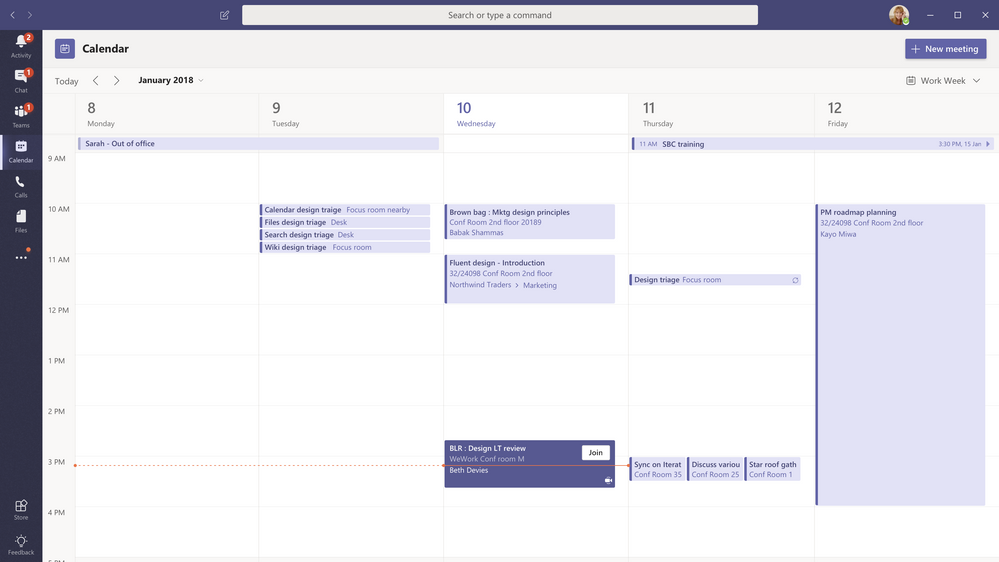
The new Calendar App is rolling out in April 2019. The existing ‘Meetings’ app in Teams will be replaced by the Calendar app that retains all existing app functionality while introducing a range of new features. Three new types of calendar views will be available: Day, Work week and Week view (default). Users will have the ability to go back or forward in time to see any past or future meeting. Users will be able to perform key actions including Join, RSVP, Edit, and Cancel from the right click menu. Meetings on the calendar will light up to indicate when someone joins it online. User’s current exchange setting for working hours and working days of the week will be respected. Lastly, users can schedule events without adding any attendees in the scheduling form. Non-Teams meetings can also be edited and updated from Teams directly.
Live Captions – coming soon as a public preview for English – make your Teams meetings more inclusive for attendees who are deaf or hard of hearing, have different levels of language proficiency, or are connecting from a loud location. Improve meeting effectiveness by allowing attendees to read speaker captions in real-time so they can more easily stay in sync and contribute to the discussion.
Customized backgrounds – coming soon – takes our intelligent background blur technology one step further, allowing participants to select a more professional background when working remotely, to appear behind them during a meeting or video call. This improves the effectiveness of remote meetings by encouraging the use of video while minimizing distractions.
Content Cameras and Intelligent Capture – coming soon – will soon support an additional camera forcontent capture, such as capturing information on analog whiteboards. Using any USB camera, Microsoft Teams Rooms leverages our new Intelligent Capture processing to capture, focus, resize, and enhance whiteboard images and text, so remote attendees can clearly see whiteboard brainstorming in real time, even when someone is standing in front of the whiteboard.
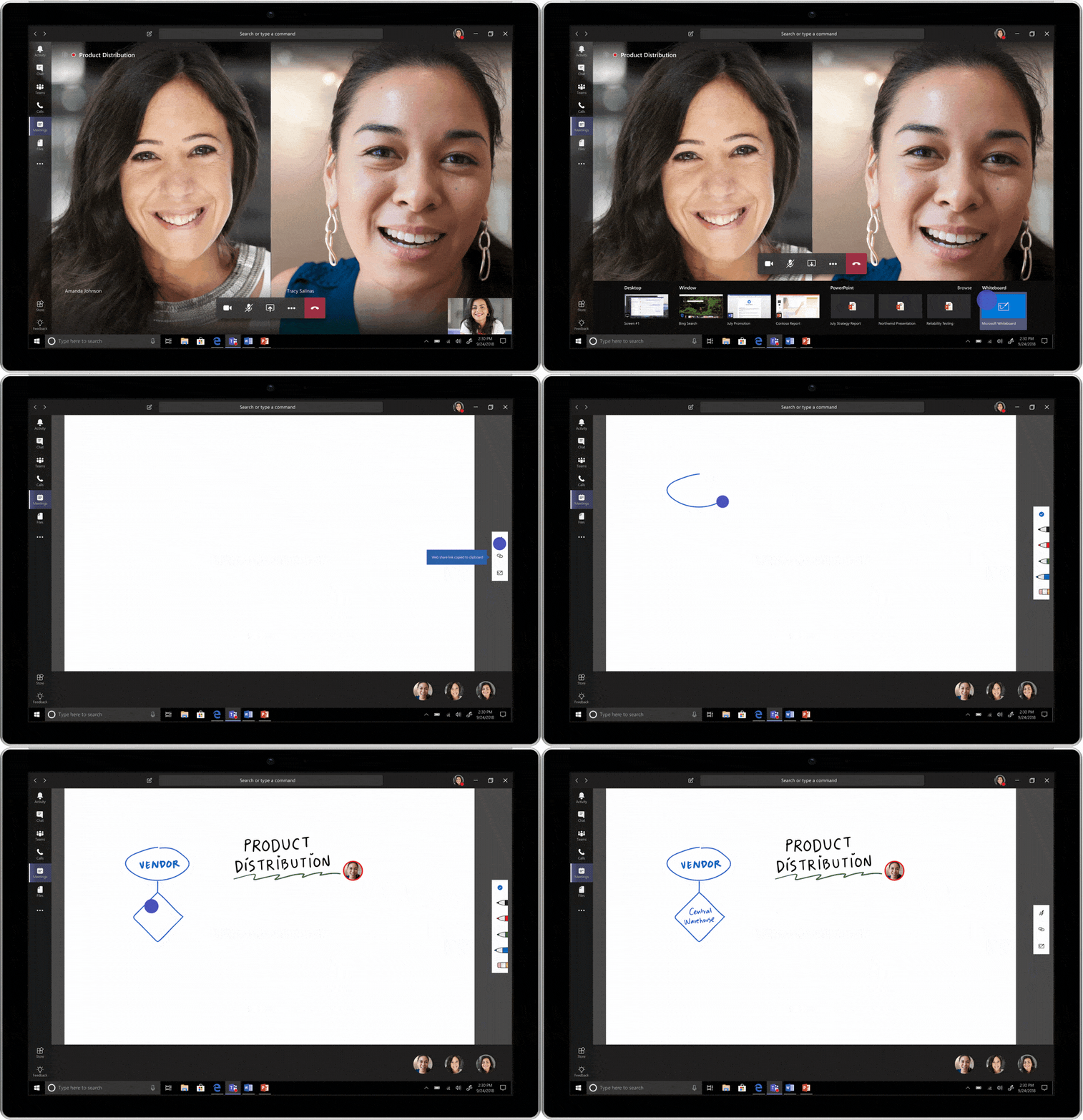
Microsoft Whiteboard in Teams meetings (commercial preview) empowers meeting attendees from the same tenant to participate in the conversation regardless of the device you use or where you are. Whether joining from the meeting room or remotely, you can start a new board in the Teams meeting (currently supported on desktop and web – coming soon to mobile). The board is automatically shared with meeting attendees. Users can ink together in real-time on the board and even launch the native Whiteboard app to enable an even richer collaboration experience with features such as sticky notes, images, and gridlines. Ink Grab, enables you to add analog content from a physical whiteboard onto the Whiteboard canvas without having to recreate it from scratch. If you start an ad-hoc brainstorm session on the physical whiteboard, you can easily continue via the digital whiteboard and include remote collaborators in the conversation. Simply take a picture of the content and use Ink Grab to transform them into digital ink. To enable Whiteboard in a Teams meeting, please turn on the Whiteboard web preview here.
Enhancements to the Chrome browser meeting experience (coming soon) are getting richer for Windows and Mac users. A year ago, we introduced frictionless meeting join in Chrome with no client needed. Coming soon, we will enhance that zero-footprint experience by adding 3 new capabilities: the ability to see participants video, application sharing, and full desktop sharing. This enables any meeting attendees to have face to face conversations and share content easily, with zero downloads needed.
Live Events in Microsoft 365 (now available) enables anyone to create live and on-demand events that deliver compelling communications to employees, customers and partners. Events use video and interactive discussion across Teams, Stream, or Yammer and can be as simple, or as sophisticated as needed, using webcams and screen sharing for informal presentations, or stream a studio-quality production for more formal events. Up to 10,000 attendees can participate in real-time from anywhere, on any device, or catch up later with powerful AI features that unlock the content of the event recording.
Meetings First (in preview) is a great addition for our Enterprise Voice customers who use Skype for Business Servers. It allows customers to protect their voice investments by continuing to use their servers for Calling and Chat while harnessing Microsoft Teams for cloud-based meetings. Your users will enjoy best in class, modern meetings while your company experiences improved performance using the Microsoft global cloud infrastructure.
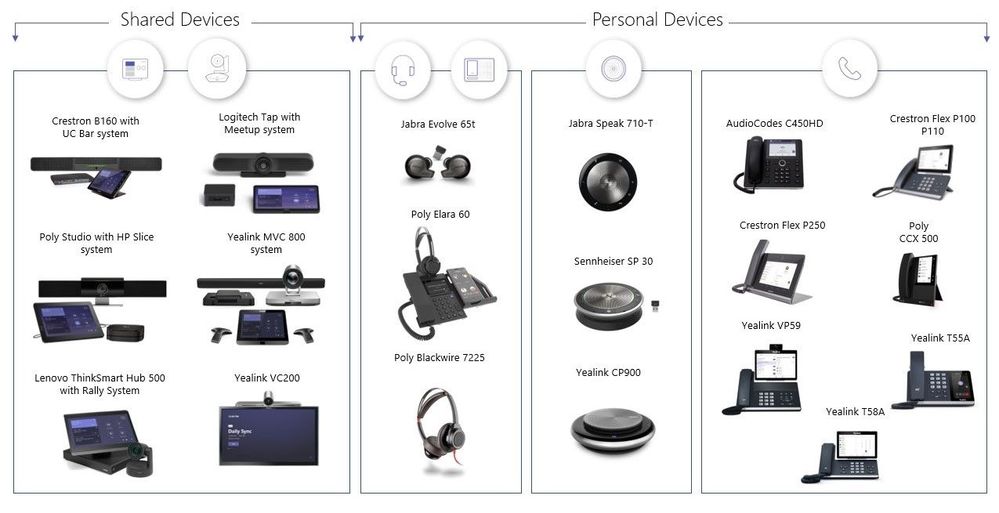
New Meeting Devices are being created by our partners increasing choice for our shared customers. Microsoft welcomes the Yealink MVC500 and MVC800 to the expanding group of devices for meeting rooms. The announced Logitech Tap offers a low-profile sleek design and can be desk-based or wall-mounted. The new Poly Studio allows for plug and play video and audio experiences which will complement the meeting room. And bring your teams together with the Yealink VC200 video conferencing device which is designed to support huddle spaces.
Phones will see new devices as well including the Poly CCX 500 and Yealink T55A which enable calling experiences for personal spaces and common areas. Additionally, the new video phones Crestron Flex P250 and Yealink VP59 allow users to experience rich video and audio on a single desk phone.
Peripherals are experiencing new innovations starting with speakerphones from Jabra Speak 710-Teams, Sennheiser SP30-Teams and Yealink CP900 all of which have dedicated Teams buttons. This integration allows you to take quick actions from your device when connected to your PC or mobile phone.
Learn more about all these great products from our partners, AudioCodes, Crestron, HP, Jabra, Lenovo, Logitech, Plantronics/Polycom, Sennheiser and Yealink at Microsoft Teams Marketplace which now includes improved experiences for shopping by device and space
CALLING
Direct Routing (available now) provides customers the ability to connect their voice trunks via certified Session Border Controllers (SBC) to Office 365. And we continue to enhance DR with key features. Media Bypass (available now) is being supported by many of our Session Border Controllers partners – this improves AV quality by enabling direct connections between callers in many scenarios. We also have added new certified SBC vendors – Oracle and TE-Systems.
We see the number of connections from certified Virtualized SBCs (available now from partners) growing in our data as well as feedback from partners that many customers are choosing to virtualize their SBCs on Azure. A “no hardware” approach can be your path to a cloud voice solution saving time and money for your deployment and operations. Be sure to check with your preferred partner if virtualization fits in with your plans to deploy Calling in Teams.
Dynamic e911, Location Based Routing, Music on Hold, and Busy on Busy are coming soon. These are additional features which voice administrators routinely request. We appreciate the feedback as it helps keep our teams prioritized for your needs. We invite you to keep an eye on our public roadmap – as we add them based on their timing.
Cloud Voicemail (CVM) has been supporting our cloud users for more than two years. We are now adding support for our Skype for Business Server customers as well as those using Lync Server 2013. Cloud processing of your voicemail will give users access to latest in technology with cloud reliability.
OFFICE 365
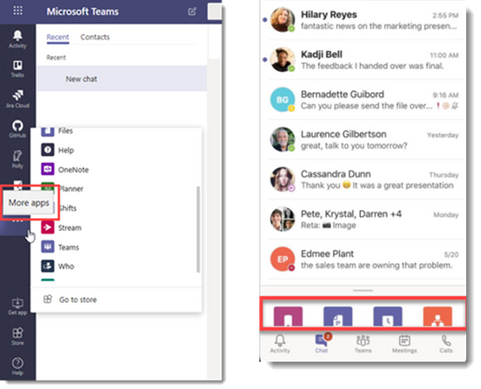
App Setup Policies are rolling out this month and provide new and more flexible ways for IT admins to manage how users can discover, use, and develop the 250+ integrations we have available in Microsoft Teams, as well as the integrations you build for your organization. App Setup Policies can customize Microsoft Teams to highlight the apps that are most important for your users. Choose the apps to pin and set the order that they appear in your left-hand rail. App setup policies let you showcase apps that users in your organization need, whether they were built by Microsoft, our partners, or your developers. These policies also manage how built-in features appear for your users. You can now manage access to apps for individual users through App permission policy. This policy lets you control who in your organization can interact with specific Microsoft and externally built apps. You can also limit access to apps built by your organization, letting you phase the app rollout. You can define org-wide settings to block certain apps outright for your tenant.
eDiscovery for Teams calling and meetings is now generally available for Office 365 and Microsoft 365 plans that include core eDiscovery capabilities. Achieve requirements for data discovery as part of an investigation or litigation for Teams content with the same in-place search, conditions and export experience as you use for the rest of Office 365 content.
Legal hold for Teams content of on-premise Exchange users is coming soon for all organizations with Office 365 or Microsoft 365 E3 plans. Because Teams stores content for Exchange on-premise users in the cloud, the same process to manage and discover against Teams channels and chats can be used. Give your legal department a sigh of relief as they embrace the modern workplace. Not only do you have all the benefits of the chat-based workspace, but you have them in a compliant way.
Custodian management for Teams memberships is now in preview as part of the new Advanced eDiscovery update. Organizations with Office 365 E5, Advanced Compliance or Microsoft 365 E5 Compliance can use the new capabilities to manage custodians as part of an investigation or litigation. Quickly identify and place a legal hold on shared locations such as Teams – based on memberships of the individual related to the case.
Retention for Teams channels and chats is now available as part of the core Data Governance capabilities in Office 365 or Microsoft 365 E3. Use this capability to place a retention and/or deletion policy on Teams channels and chat messages to ensure requirements for retention are met, and to limit risk and exposure of keeping data for too long. Select the Teams and individuals for message retention within the compliance center for broad organization, groups, and/or specific users.
Supervision for Teams channels and chats is now generally available to help organizations meeting internal communications monitoring requirements to meet regulatory compliance or internal policies. Establish policies with intelligent conditions and identify Teams or users and the related channels and / or chat messages to be included in the supervision policy. Supervisors can then review content with the new built-in review experience to tag, escalate, and/or bulk resolve.
Virtual Desktop Infrastructure (VDI) is coming In April to allow organizations to use Microsoft Teams in virtual desktop environments. This will give customers and partners the ability to collaborate effectively with private chats, open channel conversations, and file sharing. Teams can be installed in each individual virtual machine in persistent and dedicated VDI environments. This solution will work in the major VDI environments for chat and collaboration. We are also currently collaborating with Citrix to enable calling and meetings features in Teams.
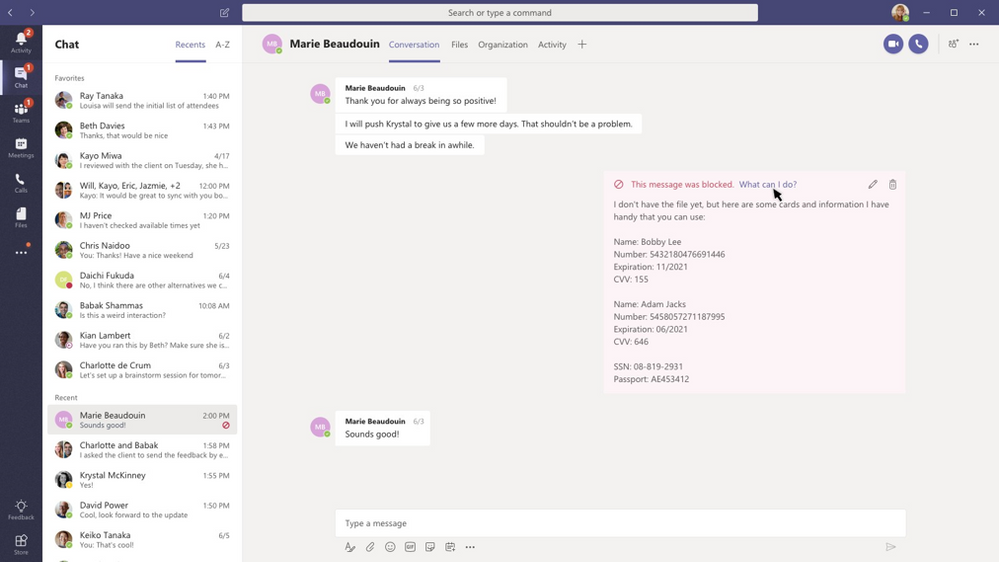
Data loss prevention (DLP) has been available for Exchange Online, SharePoint Online and OneDrive for Business for a while, and now we’re extending DLP to Microsoft Teams – to enable the blocking of sensitive information contained in chat messages and channel conversations. This is based on the same policy engine used and proven in our other DLP services. For organizations that are using Microsoft Teams to accelerate their workforce collaboration and productivity, this provides a new way to ensure proper control and governance of important data – both for the purpose of achieving internal security objectives as well as meeting external compliance and privacy requirements.
The experience is simple for end-users and balances the need to enforce data protection policies while not inhibiting end-user productivity. When someone sends a message, either within a chat or a channel, the content of the message is inspected for sensitive information – as defined by your organization. If sensitive information is identified, then the message is revoked and no longer accessible by the recipient(s). Similar to how DLP operates in other Office 365 services, policy tips gives the sender additional information on the reason for the message being blocked, such as the presence of credit card information or social security numbers. IT admins have the flexibility to configure policy to allow end-users to override the blocked message or report the issue as a false positive, which can help the company fine-tune their DLP settings. Policy settings are configured in the Security & Compliance Center as DLP settings for Exchange Online, SharePoint Online and OneDrive for Business.
APPS AND INTEGRATIONS
Core to the value of Microsoft Teams is the ability to integrate and extend the capabilities of all your solutions – whether or not Microsoft built them – into one single hub. Read on to learn about the latest integrations becoming available during the Enterprise Connect timeframe.
Control for Microsoft Teams by Smarsh extends the Microsoft DLP solution by enabling customers to enforce internal policies which improves compliance in their risk and security efforts. DLP policies can be implemented to monitor for violations across a variety of content types including conversations (chat, channels, emojis, GIFs, links, and bots), files, wiki and OneNote. Assets found to be in violation can be challenged, redacted, or deleted.
MVISION for Microsoft Teams by McAfee provides a full set of security, governance and compliance capabilities that extends the Microsoft DLP solution for Teams. The platform covers access control, policy enforcement, collaboration control, activity monitoring, threat prevention, audit trails for investigations, and helps secure multiple access modes including browsers and native apps.
InformaCast Fusion from Singlewire Software enables Microsoft Teams users to send mass urgent or emergency notifications. Users can initiate an alert using their Teams bot. The bot responds with an adaptive card where users provide details about the situation taking place. Once confirmed, the bot sends alerts through Teams, mobile devices, digital signage and other connected devices. Following distribution, safety team members will receive a prompt to join a Microsoft Teams channel where they can collaborate and follow up on the situation.
As you can see there are a ton of features that are due to come out and we at Inspired IT are love helping business use Office 365 and the whole suite of applications. If you want to have a chat please either ring us on 08 6142 8221 or email [email protected] and we would love to catch up and see how we can help you.
Breaches happen every day however this is the first time we have seen one of this mangnitude and is being labelled the “Collection #1” data breach. This breach includes: 772, 904, 991 unique email addresses, over 21 million unique passwords that were recently posted to a hacking forum.
The data set was first reported by Troy Hunt who runs and maintains the website Have I Been Pwned, if you are unfamiliar with that site its a way to search whether your own email or password has been compromised.
The good thing about this data breach going public is that you can find out if your email and password were among the impacted accounts. These have already been loaded onto the site, you just have to enter in your email address and hope 🙂
Data breaches like this should not be taken likely, most people work with very similar passwords across a mutiple of accounts so it leaves you very vulvernalbe.
Multi factor Authentication is certainly a good step as is investing in a password manager so that you use unique passwords per account you have. 2019 will be a big year as these things continue to happen as we move more and more to a digital world.
If you have any concerns that you maybe affected and if you are a existing client please email [email protected] alternatively if we haven’t done any business together please email [email protected] or ring 08 6142 8221 and if you are in Perth lets catchup for a coffee.
Since Windows 10 and previous operating systems, you have been able to copy and paste text and images however the process has been limited and you have been able to get extra functions by using 3rd party tools.
However since October 2018 in Microsoft latest OS update they have overcome these limitations to make your clipboard experience more useful and more inline with this 3rd party tools.
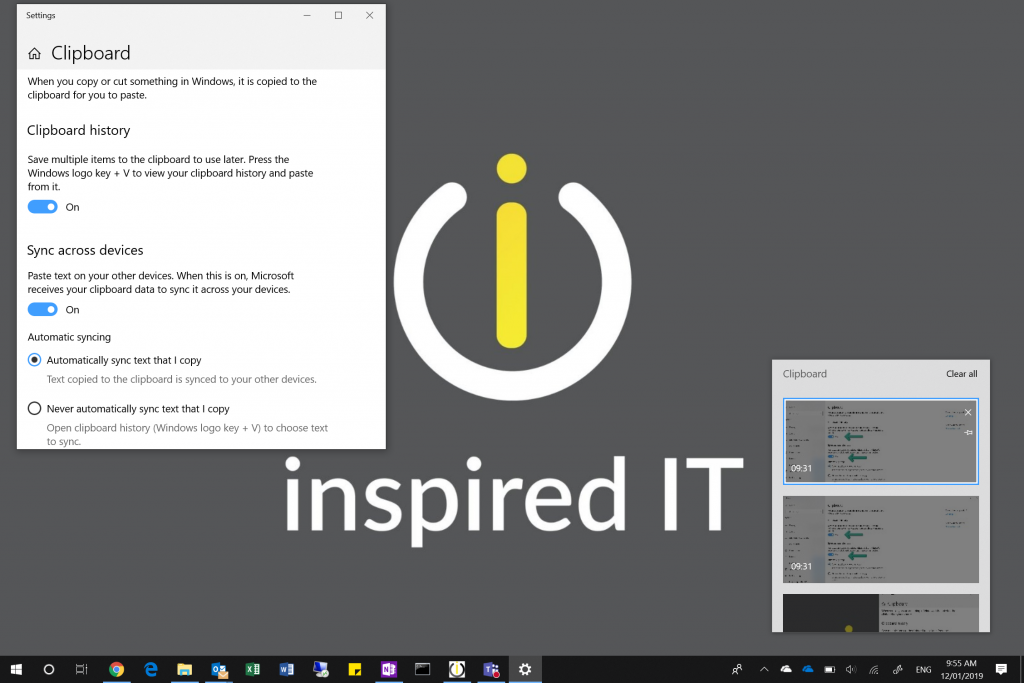
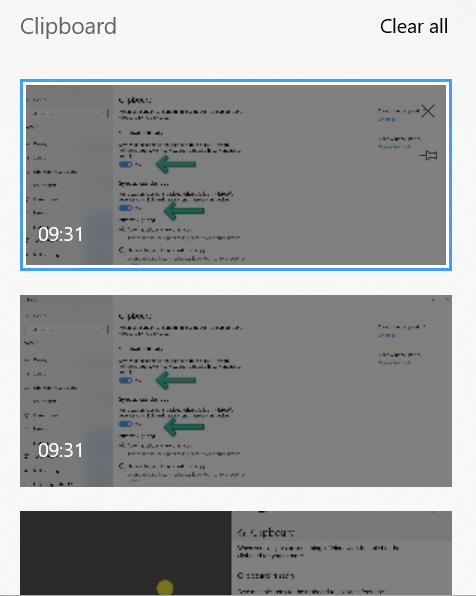
In the new Windows 10 feature, Windows 10 tracks text and images that you copy and then review your historic clipboard history. In addition to this feature you can also enable it to sync to all your other devices assigned to your Office 365 Account.
From my experience, this feature is not enabled by default….why, I don’t know? However follow the below steps to enable:-
How to enable the NEW clipboard on Windows 10
Open Settings
Click on System
Click on Clipboard
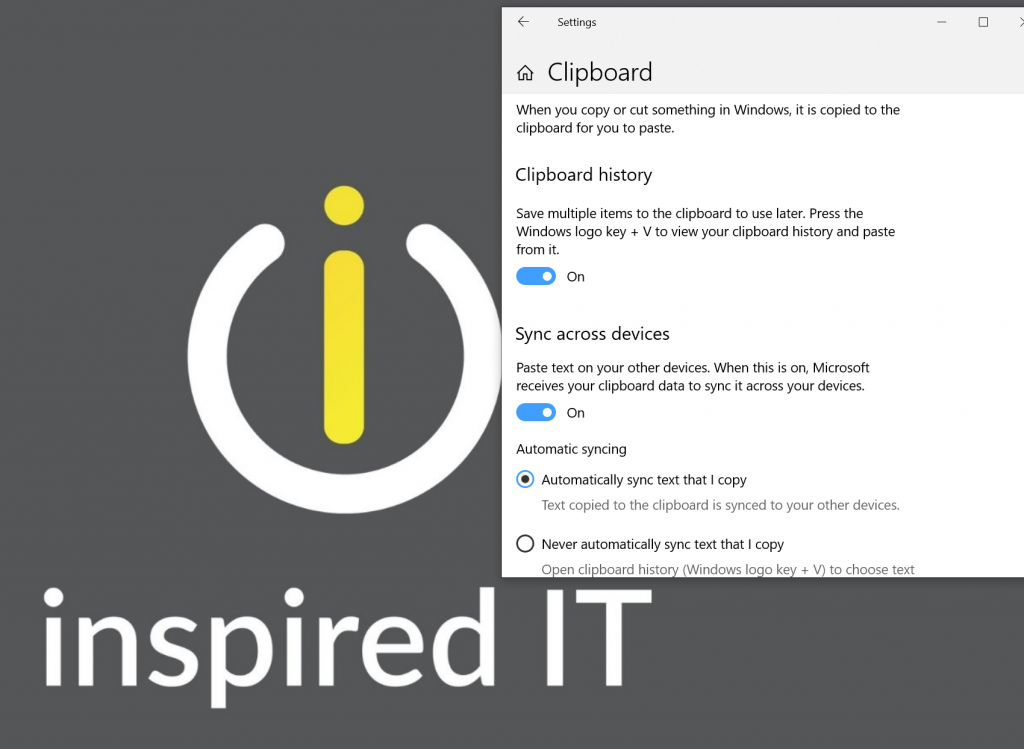
Turn the Clipboard History toggle switch to ON
How to Sync Clipboard History on Windows 10
Open Settings
Click on System
Click on Clipboard
Turn the toggle switch to ON Under “Sync Across Devices”
How do I use the shortcut keys with the new Clipboard Feature
Previously you used to use Ctrl + C or Ctrl + V to copy and paste. To use the new feature select the Win + C or Win + V to get the new Clipboard History Feature.
So if you are running the October Update or later (which you should be by now) try turning this feature on.
At Inspired IT, we specialise in Office 365 and Managed IT Services so if you are in Perth and you want to see how we can how you and your business please email [email protected]. If you are not in Perth then let’s connect via the phone (08 6142 8221) or via a Microsoft Teams meeting as we have clients all over Australia. We would love to partner with you and help your business shift to a modern desktop.
With 2018 in the sunset it brings us closer to when Windows 7, Server 2008/R2, SQL 2008/R2, Exchange 2010 and Office 2010 are no longer supported
There are a considerable amount of machines running these products in the world, and you have 1 year to decide what you are going to do….. or less. Thinking about this now also allows you to put the migration costs in the budget for next year if you do not have the budget this year.
So what are the dates and applications I hear you ask?
Windows 7 – End of life on January 14th 2020
Server 2008 and Server 2008R2 – End of life on January 14th 2020:
Exchange 2010 – End of life on January 14th 2020:
End of Life on October 13th 2020:-
Office 2010 – October 13th 2020
SQL Server 2008 and SQL Server 2008R2 – July 9th 2019
What’s the right upgrade path for me and my business?
I have always loved running the latest version and embracing the new technology….and now is the perfect time to review what you are doing as a business and assess. Ask yourself is this the way you want your business to work in 5 years, do my IT Systems allow the flexibility for the company to grow or shrink, should I move to a subscription-based model of software and hardware and should I go cloud are a few questions to start with. A few years ago in IT, there was 1 way to do everything, and now there are 101 ways to do everything, so you have to find what’s the best for you, your staff, your business and does it fit in with your budget. Then engage with the right IT Provider that specialises in those services or the way you want to work.
Being an IT Professional, we see a host of different options, setups and we know what works and does not work. Engage with an IT Professional and talk about the possibilities that you have available to you because now is a good time to talk as there is still plenty of time to get it right and choose the right IT Provider.
So where do I start?
Assess your current Inventory and identify which software you are running on and which devices/hardware
Sit down and discuss the options, current pain points of your business with your IT Provider
Choose the right upgrade path for you and your business
The conclusion
Office 365 for me is one of the best things you can do for your business. It does not work for everyone, and it depends what applications you use, for a majority of companies under 50 staff its the perfect fit, I am a firm believer of keeping it simple because IT, Business and life are complicated enough.
It does not have to be scary, and while its a significant change to the business and there is a bit of learning required from the staff, it does not have to have a large impact on the company (if done correctly).
At Inspired IT, we are finding that majority of our clients with Office 365 and then coupled with our Office 365 designed Managed Services it allows the business owners and staff to concentrate on what they are employed to do. Whether that be working on the business, interacting with your clients, adding value to your clients or servicing their needs while giving that collaboration between your staff and building that strong team ethic which you need in today’s business.
If you want to talk about any of the points mentioned above, I am more then happy to discuss this over a coffee (if you are in Perth), Video, Phone or email. I promise I won’t sell you our services unless you ask. My main priority is to give you enough information to make an informed decision on what’s best for you and your business going forward.